
Introduction
Customer relationship management (CRM) systems are used to organize customer data, track communication, and manage sales processes in a structured way. These tools are commonly used by teams that handle multiple leads and need a centralized system to monitor interactions.
One such tool in this category is Pipedrive, which is designed around pipeline-based sales tracking. It focuses on visualizing deals and managing them through different stages of a sales process.
What Is Pipedrive?
Pipedrive is a CRM software that focuses on sales pipeline management. It is built to help users track leads, manage deals, and record communication activity in a structured workflow.
It is typically used by sales teams, small businesses, and organizations that need a clear visual representation of their deal stages.
Explore FeatPipedrive overviewures
Key Features Explained
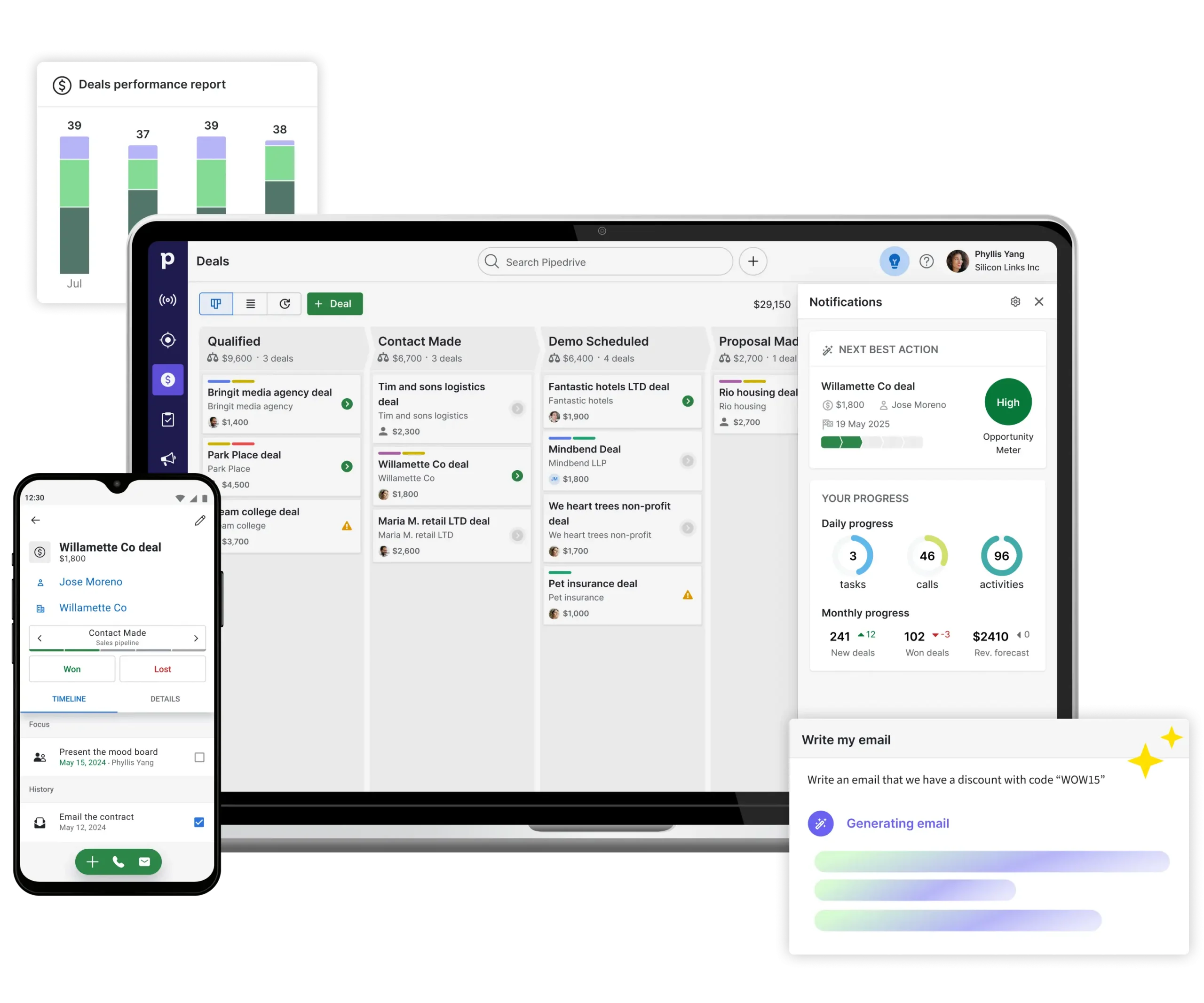
1. Sales Pipeline View
Pipedrive organizes deals into stages such as “lead,” “contact made,” or “negotiation.” This allows users to see where each opportunity stands in the process.
2. Contact Management
The system stores customer details, communication history, and activity notes in one place.
3. Activity Tracking
Users can log emails, calls, meetings, and follow-up tasks linked to specific deals or contacts.
4. Automation Tools
Basic automation can help reduce repetitive tasks such as sending reminders or updating deal stages.
5. Reporting and Insights
The platform provides reports on sales performance, pipeline value, and activity trends.
Common Use Cases
Pipedrive is generally used in scenarios such as:
- Managing structured sales pipelines
- Tracking multiple client conversations at once
- Organizing follow-up tasks for sales teams
- Monitoring deal progression across stages
- Centralizing communication history for leads
Potential Advantages
The following points represent possible functional benefits:
- Clear visual representation of sales pipelines
- Centralized tracking of communication and deals
- Organized workflow for managing multiple leads
- Task reminders that help structure follow-ups
- Simple interface compared to more complex enterprise systems
Limitations & Considerations
Like other CRM systems, Pipedrive has certain limitations:
- Primarily focused on sales workflows rather than general business management
- Advanced customization may be limited for complex enterprise needs
- Some automation features may require higher-tier plans
- Learning curve for users unfamiliar with CRM systems
- Dependence on structured pipeline-based usage, which may not suit all workflows
Who Should Consider This Tool
Pipedrive may be suitable for:
- Small to mid-sized sales teams
- Businesses managing structured lead pipelines
- Teams that rely on visual deal tracking
- Organizations needing basic CRM functionality without heavy complexity
Who May Want to Avoid It
It may not be ideal for:
- Users who only need basic contact storage without pipelines
- Large enterprises requiring deep customization and complex workflows
- Teams focused more on marketing automation than sales tracking
- Users seeking a lightweight personal CRM system
Comparison With Similar Tools
CRM platforms often differ based on their focus areas:
- Some CRMs emphasize marketing automation and customer campaigns
- Others focus on communication tools like email or calling integration
- Certain systems are designed for enterprise-level customization and scalability
Pipedrive is generally positioned in the category of pipeline-focused CRM systems rather than all-in-one business platforms.
Final Educational Summary
Pipedrive is a CRM tool designed to organize and track sales pipelines through a structured visual system. It is mainly used for managing leads, tracking communication, and monitoring deal progress in a simplified workflow format.
Its suitability depends on how closely its pipeline-based structure aligns with an organization’s sales process. Users typically compare it with other CRM systems before selecting a platform based on operational needs.
Readers should evaluate tools based on their own requirements and workflow expectations.
Pipedrive overview
