Introduction
Websites often need ways to collect information from users—such as contact details, feedback, registrations, or survey responses. Building these forms manually can require technical knowledge, especially when handling data validation, storage, and integrations with other systems.
Form builder tools exist to simplify this process. They allow users to create and manage forms without writing code, while still offering flexibility for more advanced configurations.
Gravity Forms is one such tool designed for websites built on the WordPress platform. It is developed by Rocketgenius and is commonly used to create and manage structured forms within a website environment.
What Is Gravity Forms?
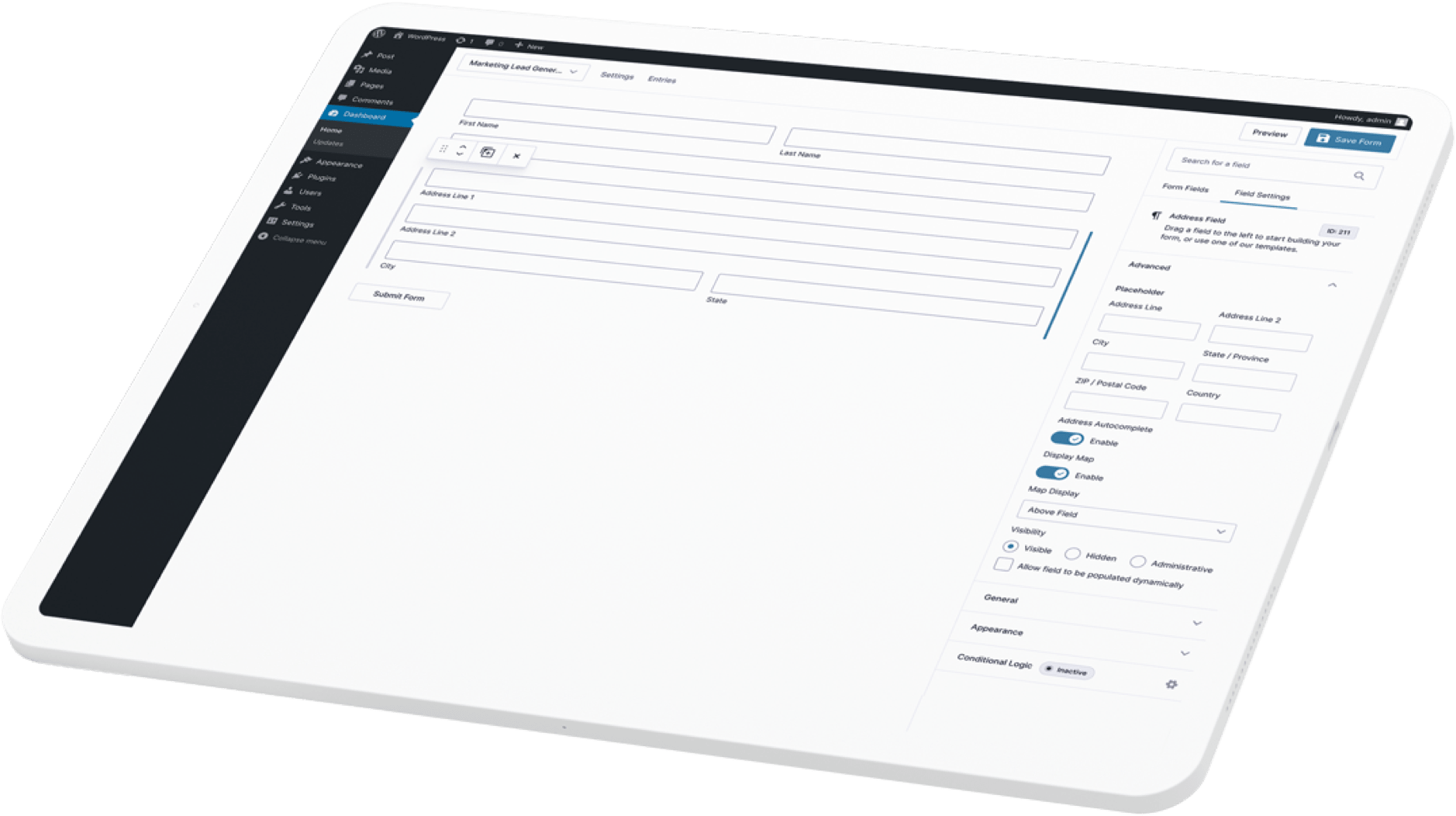
Gravity Forms is a plugin for WordPress that enables users to create forms through a graphical interface rather than manual coding.
It belongs to the category of form builder software and is typically used by website administrators, developers, and content managers who need to collect and process user input.
Instead of building forms from scratch using HTML or backend logic, users configure form fields through a visual editor and define how submissions are handled.
The tool integrates with WordPress, meaning it operates within the same environment as the website content management system.
Learn More About Gravity Forms
Key Features Explained
The following are commonly associated features of Gravity Forms, described in functional terms:
1. Form Builder Interface
Gravity Forms provides a drag-and-drop interface where users can add, remove, and arrange form fields such as text inputs, dropdowns, checkboxes, and file uploads.
2. Conditional Logic
Users can configure rules that show or hide certain fields based on previous inputs. This allows forms to adapt dynamically to user responses.
3. Entry Management
Submitted form data is stored within the WordPress database and can be viewed, filtered, and exported through the admin dashboard.
4. Notifications and Confirmations
The system allows automated email notifications after form submission, as well as customizable confirmation messages or redirects.
5. Integration Support
Gravity Forms can connect with external services such as email marketing platforms, payment gateways, and CRMs through add-ons or APIs.
6. File Upload Handling
Users can configure forms to accept file uploads, which are stored and managed within the system.
7. Anti-Spam Measures
It includes options such as CAPTCHA integration and other mechanisms to reduce automated spam submissions.
Common Use Cases
Gravity Forms is used in a variety of practical scenarios, including:
Contact Forms
Website owners use it to create structured contact forms that collect names, emails, and messages from visitors.
Registration Forms
It can support event registrations, account sign-ups, or membership applications with multiple input fields.
Surveys and Feedback Forms
Organizations may use it to gather structured feedback from users, including rating scales and open-ended responses.
Order or Booking Forms
When combined with payment integrations, it can be used to create simple order forms or service booking workflows.
Internal Data Collection
Teams may use it for internal processes such as request submissions, approvals, or data collection workflows within an organization.
Potential Advantages
The following points describe potential strengths of using a tool like Gravity Forms:
- It provides a structured way to build forms without manual coding.
- It integrates directly into the WordPress ecosystem.
- Conditional logic allows forms to behave dynamically based on user input.
- It supports data collection and management within a single interface.
- It offers extensibility through add-ons and integrations.
These are general observations based on the tool’s design and intended usage.
Limitations & Considerations
Like any software, Gravity Forms has certain limitations and trade-offs that should be considered:
- Platform dependency: It is designed specifically for WordPress websites and cannot be used independently outside that environment.
- Learning curve: While the interface is visual, advanced features such as conditional logic or integrations may require time to understand.
- Add-on dependency: Some functionalities depend on additional extensions, which may require separate configuration.
- Performance considerations: On websites with many forms or heavy usage, performance may depend on hosting environment and optimization.
- Maintenance: Being a plugin, it requires updates and compatibility checks with WordPress versions and other plugins.
These factors can influence how suitable the tool is for a particular project.
Who Should Consider Gravity Forms
Gravity Forms may be relevant for:
- Website administrators managing WordPress sites
- Developers building form-based workflows within WordPress
- Organizations that need structured data collection
- Users who require conditional logic in forms
- Projects that involve integrations with third-party services
It is generally suited for environments where WordPress is already the core platform.
Who May Want to Avoid Gravity Forms
Gravity Forms may not be suitable for:
- Users who do not use WordPress as their website platform
- Projects requiring a standalone form builder outside a CMS
- Situations where minimal configuration tools are preferred
- Users who require a fully hosted, non-WordPress solution
- Environments where plugin dependency is restricted or discouraged
In such cases, alternative tools that operate independently of WordPress may be more appropriate.
Comparison With Similar Tools
Gravity Forms is one of several form-building solutions available for WordPress and beyond. Other tools in this category include:
- WPForms – Another WordPress-based form builder with a similar visual interface.
- Contact Form 7 – A more basic plugin that relies on manual configuration rather than drag-and-drop editing.
- Formidable Forms – A plugin that includes additional features for data display and application building.
Compared to these tools, Gravity Forms is often positioned as a feature-rich option with support for advanced logic and integrations, though the overall suitability depends on specific project requirements.
No tool is universally superior; differences lie in workflow preferences, feature requirements, and technical constraints.
Final Educational Summary
Gravity Forms is a WordPress plugin designed to help users create and manage forms through a visual interface. It supports features such as conditional logic, data storage, notifications, and integrations with external services.
It is commonly used for contact forms, registrations, surveys, and other structured data collection tasks within WordPress websites. While it offers flexibility and extensibility, it also depends on the WordPress ecosystem and may involve a learning curve for advanced configurations.
When evaluating such tools, it is important to consider platform compatibility, required features, integration needs, and long-term maintenance requirements. Different tools may serve similar purposes but differ in architecture and workflow.
Readers should evaluate tools based on their own requirements and technical environment.
Disclosure: This article is for educational and informational purposes only. Some links on this website may be affiliate links, but this does not influence our editorial content or evaluations.