
Introduction
Email outreach continues to be widely used in business communication, especially for sales, partnerships, and client acquisition. However, one of the less visible challenges behind email outreach is deliverability—whether a message actually reaches the recipient’s inbox or gets filtered into spam.
This issue becomes more noticeable when using new email accounts or domains. Email providers like Gmail and Outlook rely on sender behavior patterns to determine trust. If an account suddenly sends a large volume of emails without prior activity, it may trigger spam filters, even if the emails themselves are legitimate.
To address this, a category of tools has emerged that focuses specifically on email warm-up. These tools simulate natural email activity over time to help build sender credibility. Warmup Inbox is one such platform designed to automate this process and provide visibility into how emails are being treated by receiving servers.
What Is Warmup Inbox?
Warmup Inbox is a deliverability-focused email tool that automates the process of gradually preparing an email account for regular sending activity. Instead of sending campaigns, it works behind the scenes by generating interactions that resemble everyday email usage.
The platform connects to an email account and exchanges messages within a network of other inboxes. These messages are opened, replied to, and sometimes marked as important. The goal is to create a pattern of engagement that signals to email providers that the account is active and behaves like a real user.
This type of tool is generally used by:
- Sales professionals working with outbound email
- Marketing teams running cold outreach campaigns
- Agencies managing multiple client email accounts
- Businesses setting up new domains for communication
Warmup Inbox fits into the broader category of email deliverability tools, alongside spam testing and inbox monitoring solutions.
Key Features Explained
Warmup Inbox includes several functions that are designed to simulate email engagement and track performance. These features are practical in nature and focus on process automation rather than campaign execution.
Automated Interaction System
The platform sends and receives emails daily using the connected account. These interactions include replies and message opens, which help establish a consistent activity pattern.
Inbox Placement Tracking
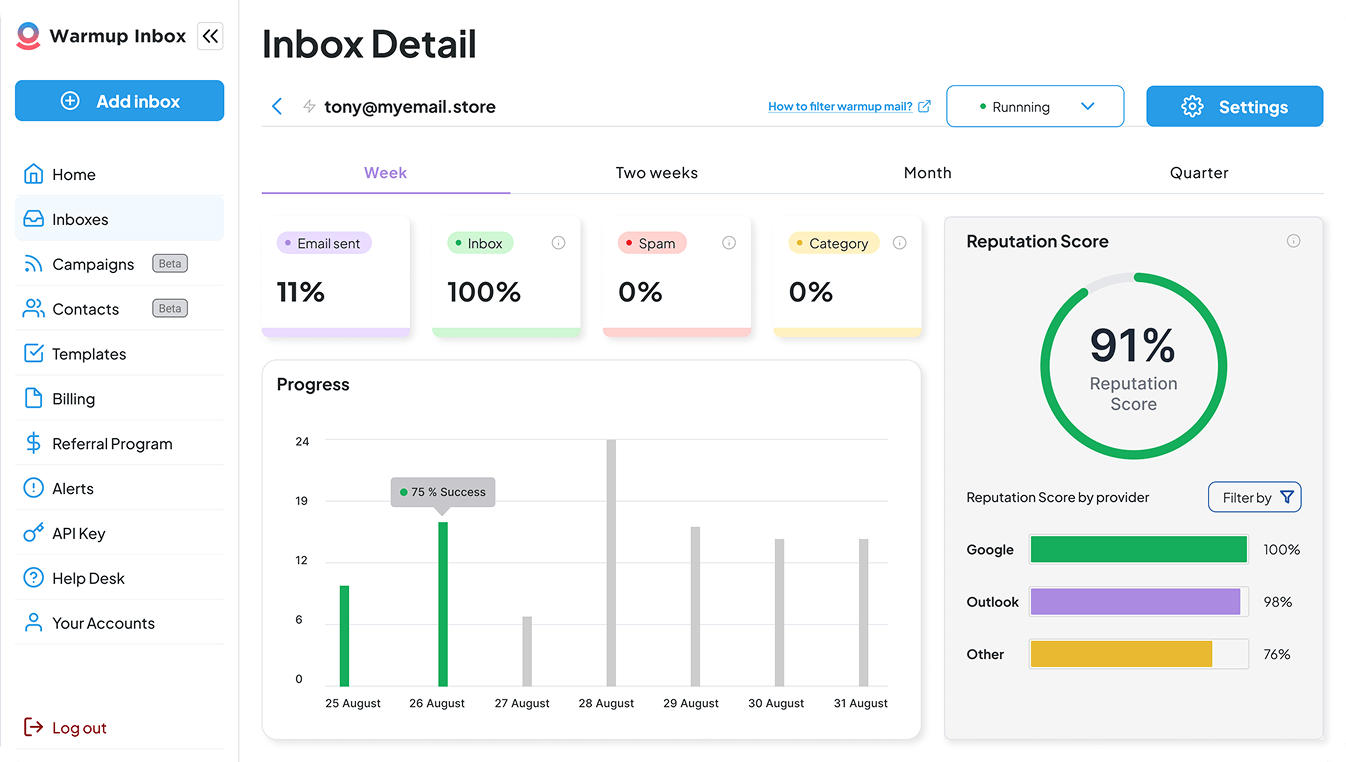
Users can monitor whether their emails are landing in the inbox, spam folder, or other categories. This helps identify potential deliverability issues early.
Spam Folder Correction Simulation
When emails land in spam within the network, the system marks them as “not spam.” This action is intended to mimic positive user feedback.
Adjustable Warm-Up Volume
The number of daily interactions can be increased or decreased depending on the account’s age and condition. This allows for gradual scaling.
Support for Multiple Email Providers
Warmup Inbox works with common platforms like Gmail and Outlook, as well as custom SMTP configurations.
Common Use Cases
Different types of users rely on warm-up tools depending on their workflow and communication strategy.
Preparing New Email Accounts
Newly created email accounts often lack sending history. Warm-up tools help establish baseline activity before regular usage begins.
Cold Outreach Campaign Setup
Before launching campaigns, users may warm up accounts to reduce the risk of emails being flagged as spam.
Monitoring Deliverability Trends
Teams that depend heavily on email communication may use the tool to track inbox placement over time.
Managing Multiple Domains
Agencies or larger teams working with several domains can use warm-up tools to maintain consistency across accounts.
Potential Advantages
Reduced Manual Effort
Automating the warm-up process removes the need to manually send and reply to emails during the initial setup phase.
Visibility Into Email Behavior
Tracking where emails land provides useful insights into how email providers interpret account activity.
Structured Activity Growth
Gradual increases in sending volume may help avoid sudden spikes that trigger spam filters.
Broad Compatibility
Support for multiple providers allows the tool to fit into different technical environments.
Limitations & Considerations
No Direct Control Over Deliverability Outcomes
Email deliverability depends on several external factors, including content quality and recipient behavior. Warm-up alone does not determine success.
Simulated Engagement Environment
The interactions occur within a controlled network, which may not fully reflect real-world scenarios.
Ongoing Maintenance
Accounts may require continuous warm-up activity, especially if sending patterns are inconsistent.
Regulatory Responsibility
Users remain responsible for complying with email laws and data protection regulations.
Initial Learning Curve
Understanding how to configure warm-up settings effectively may require some familiarity with deliverability concepts.
Who Should Consider Warmup Inbox
Warmup Inbox may be suitable for:
- Teams conducting regular outbound email campaigns
- Businesses setting up new communication domains
- Agencies handling client email infrastructure
- Users interested in monitoring inbox placement trends
Who May Want to Avoid Warmup Inbox
It may not be necessary for:
- Individuals using email for basic personal communication
- Businesses relying primarily on inbound leads
- Users expecting immediate changes in deliverability
- Those unfamiliar with email compliance requirements
Comparison With Similar Tools
Warmup Inbox is part of a broader group of tools addressing similar challenges.
- Mailwarm focuses on simple warm-up automation
- Lemwarm is integrated within a larger outreach ecosystem
- Warmbox provides scenario-based customization
Each tool differs in terms of automation style, reporting, and integration depth. Selection usually depends on how the tool fits into an existing workflow.
Final Educational Summary
Warmup Inbox is designed to automate the process of building email account activity through simulated interactions. It provides visibility into inbox placement and allows users to gradually increase sending behavior. While it can support better email practices, it does not replace the need for thoughtful outreach strategies and compliance awareness.
Readers should evaluate whether such tools align with their communication needs and technical understanding before incorporating them into their workflow.
Disclosure: This article is for educational and informational purposes only. Some links on this website may be affiliate links, but this does not influence our editorial content or evaluations.
