Introduction
Managing customer relationships has become a central part of how businesses operate in digital environments. As organizations interact with customers across multiple channels—such as email, calls, websites, and messaging platforms—the need to organize and track these interactions has increased. Without structured systems, important information can become scattered, making it difficult to maintain consistent communication or follow up effectively.
Customer Relationship Management (CRM) tools are designed to address this challenge. These systems help store customer data, track interactions, manage leads, and support sales or service processes. Instead of relying on spreadsheets or disconnected tools, CRM platforms provide a centralized environment where teams can access and update information in real time.
The rise of web-based CRM solutions has made these tools more accessible to small and medium-sized businesses, not just large enterprises. Many platforms now offer features such as pipeline tracking, task management, and communication logs, allowing teams to coordinate their work more efficiently. However, not all CRM tools are built in the same way, and their capabilities can vary depending on their design and intended users.
Lurco, associated with LucroCRM, is one such platform in the CRM category. It appears to focus on helping users manage leads, customer interactions, and sales-related activities through a web-based interface. This article provides a neutral and educational overview of Lurco, explaining its features, common use cases, and potential limitations so readers can understand how it fits within the broader CRM ecosystem.
What Is Lurco?
Lurco (LucroCRM) is a web-based customer relationship management platform designed to help users organize customer data, track leads, and manage interactions throughout the sales or communication lifecycle. It falls under the category of CRM software and is typically used by businesses that need a structured way to handle customer information.
The platform provides a centralized system where users can store details about contacts, including communication history and status within a sales pipeline. This allows teams to track where each lead or customer stands, whether they are in the initial contact stage, ongoing negotiation, or post-sale follow-up.
Like many CRM tools, Lurco operates through an online dashboard. Users log in to access their data, update records, and monitor activities. This web-based approach allows multiple team members to access the system from different locations, making it suitable for distributed teams.
CRM platforms like Lurco are commonly used by sales teams, customer support staff, and business owners who need visibility into their customer interactions. The system may also support task assignments and reminders, helping ensure that follow-ups are not missed.
It is important to note that CRM tools do not directly generate customers or sales; rather, they provide a structured environment to manage existing interactions more efficiently. The effectiveness of such tools depends on how consistently and accurately they are used.
Key Features Explained
Lurco (LucroCRM) includes several features that are typical of CRM systems, focusing on organizing and managing customer-related data.
One of the central features is contact management, which allows users to store and organize customer information in a structured format. This may include names, email addresses, phone numbers, and notes related to interactions. Having this data in one place helps maintain consistency across communications.
Another feature is lead tracking, where potential customers are monitored through different stages of a pipeline. Users can update the status of each lead, providing visibility into ongoing activities and helping teams understand their current workload.
The platform may also include pipeline visualization, which presents leads and opportunities in a visual format, such as stages or columns. This helps users quickly identify where each contact is within the process.
Task and activity management is another component. Users can create tasks, set reminders, and assign responsibilities to team members. This helps ensure that follow-ups and scheduled actions are completed on time.
Some CRM systems, including Lurco, may offer communication logging, where emails, calls, or notes are recorded within the system. This creates a history of interactions that can be referenced later.
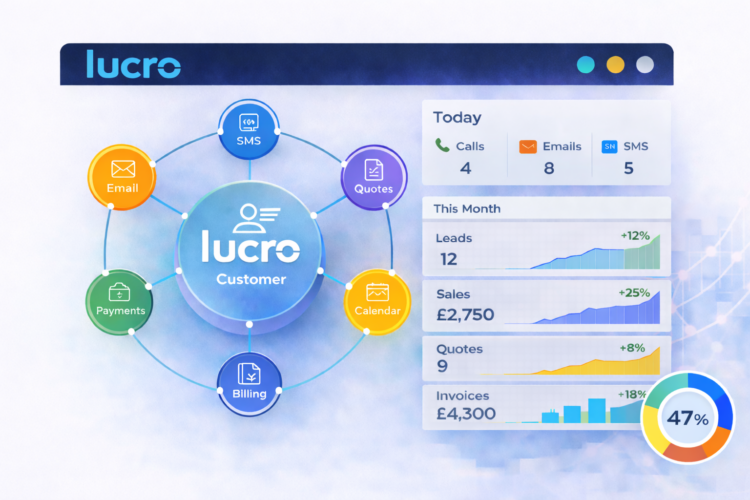
Additionally, the platform may provide basic reporting or dashboards, allowing users to view summaries of their activities, such as the number of leads or progress through the pipeline.
Common Use Cases
Lurco (LucroCRM) can be used in various business scenarios where managing customer information is important. One common use case is sales pipeline management, where teams track potential customers from initial contact to final conversion. This helps maintain visibility into ongoing opportunities.
Another use case is customer follow-up tracking. Businesses that rely on regular communication with clients can use the system to schedule and monitor follow-ups, reducing the risk of missed interactions.
Small businesses and startups may use Lurco as a central database for customer information, replacing spreadsheets or scattered notes. This can improve organization and make it easier to access data when needed.
Freelancers and service providers may also use CRM tools to manage client relationships, track project-related communication, and maintain records of past interactions.
In some cases, the platform can support team collaboration, where multiple users work on the same set of leads or customers. This allows for shared visibility and coordination.
Potential Advantages
One potential advantage of Lurco is centralized data management, which allows users to store customer information in a single system. This can reduce fragmentation and improve accessibility.
Another advantage is visibility into workflows. By tracking leads and activities, users can gain a clearer understanding of their ongoing processes.
The platform may also support basic organization and structure, helping users move away from unstructured methods like spreadsheets or manual notes.
Additionally, web-based access allows users to log in from different locations, which can be useful for teams working remotely or across multiple locations.
These advantages depend on consistent use and proper data entry, as the system relies on accurate information to function effectively.
Limitations & Considerations
Lurco (LucroCRM), like many CRM tools, has limitations that should be considered. One potential limitation is feature depth. Depending on the version and configuration, it may not include advanced automation or analytics found in more complex CRM platforms.
Another consideration is the learning curve. Users who are new to CRM systems may need time to understand how to structure their data and workflows effectively.
There may also be integration limitations, particularly if users rely on other tools such as email marketing platforms or accounting software. Compatibility with external systems can vary.
Data accuracy is another factor. CRM systems depend on manual input in many cases, and incomplete or outdated data can reduce their usefulness.
Additionally, users should consider data privacy and security, especially when storing sensitive customer information in a third-party platform.
Who Should Consider Lurco
Lurco may be suitable for small to medium-sized businesses, freelancers, and teams that need a basic CRM system to organize customer data and track interactions.
It may also be relevant for users transitioning from manual methods to a more structured system.
Who May Want to Avoid Lurco
This tool may be less suitable for large organizations that require advanced CRM features, such as complex automation, deep analytics, or extensive integrations.
Users who prefer fully customized or self-hosted solutions may also find limitations in a web-based CRM platform.
Comparison With Similar Tools
Lurco operates in the same category as CRM platforms like HubSpot CRM, Zoho CRM, and Pipedrive. While these tools share similar core functions, they differ in terms of feature complexity, customization, and integration capabilities.
Some platforms focus on advanced automation and analytics, while others provide simpler interfaces for basic use cases. Lurco appears to align more with straightforward CRM functionality, though the exact capabilities depend on its configuration.
Final Educational Summary
Lurco (LucroCRM) is a web-based CRM platform designed to help users manage customer data, track leads, and organize interactions within a structured system. It provides tools for contact management, pipeline tracking, and task organization, supporting basic customer relationship workflows.
While it offers practical functionality for organizing data, it may have limitations in terms of advanced features and integrations. Its suitability depends on the scale of operations and the specific needs of the user.
Readers should evaluate CRM tools based on their workflow requirements, data management needs, and technical preferences before making decisions.
Frequently Asked Questions
1. What is Lurco used for?
It is used to manage customer relationships, track leads, and organize communication data.
2. Is Lurco a CRM tool?
Yes, it falls under the category of customer relationship management software.
3. Can small businesses use Lurco?
Yes, it may be suitable for small businesses needing basic CRM functionality.
4. Does it automate sales processes?
It may include basic tracking, but advanced automation depends on the platform’s features.
Disclosure: This article is for educational and informational purposes only. Some links on this website may be affiliate links, but this does not influence our editorial content or evaluations.