Introduction
Digital communication increasingly relies on visual formats such as presentations, interactive documents, and structured summaries. In professional, academic, and educational environments, the ability to organize information clearly and present it visually has become an important skill. However, producing visually structured content often requires design knowledge, time, and familiarity with specialized software.
Traditional presentation tools typically involve manual formatting, slide arrangement, and design adjustments. These steps can slow down the process of turning ideas into structured visual material. As a result, a new category of software has emerged that integrates automation and artificial intelligence into the presentation workflow.
AI-assisted presentation platforms aim to simplify the creation of structured content. Instead of starting with blank slides, users can begin with a topic or prompt, and the system helps generate layouts, structure, and initial content. These tools are part of a broader shift toward generative productivity software that combines writing, design, and layout assistance.
Gamma App is one example of software designed for this purpose. It belongs to a group of tools focused on automated presentation building, AI-assisted document generation, and visual storytelling for digital communication.
What Is Gamma App?
Gamma App is an AI-supported presentation and document creation platform designed to help users organize ideas into structured visual formats. Rather than relying on traditional slide-by-slide editing, the platform generates a sequence of content blocks that function similarly to interactive slides or cards.
The tool operates at the intersection of several software categories:
- AI presentation generators
- interactive document platforms
- visual storytelling tools
- productivity software for content structuring
Users typically begin by entering a prompt, outline, or written concept. Gamma App then generates a structured presentation or document layout that includes headings, sections, visual elements, and suggested formatting.
Unlike conventional presentation software where each slide must be manually designed, Gamma App emphasizes content flow. The system produces a sequence of visual cards that can include text, images, embedded media, and layout variations. This approach attempts to streamline the process of transforming raw ideas into visually organized material.
The platform is generally used through a web-based interface, making it accessible through modern browsers without requiring local software installation.
Key Features Explained
AI-Assisted Content Generation
One of the primary capabilities of Gamma App is its AI-based content generation system. When provided with a topic or outline, the platform can generate structured sections that resemble slides or content cards.
These generated sections may include:
- headlines
- supporting text
- bullet points
- suggested structure for the overall presentation
This functionality can assist users during early stages of content development, especially when organizing large amounts of information.
Card-Based Presentation Structure
Traditional presentation tools use individual slides arranged sequentially. Gamma App instead uses a card-based structure. Each card functions as a modular piece of content that can be rearranged or expanded.
Cards may include:
- text content
- media embeds
- charts or visual elements
- layout variations
This structure encourages flexible editing and reorganization of content without needing to redesign entire slides.
Built-In Layout and Design Automation
Design can often become a time-consuming element of presentation creation. Gamma App includes automated layout formatting that adjusts typography, spacing, and visual hierarchy.
Instead of manually aligning text boxes or resizing images, users interact with predefined layout structures. The system automatically adjusts the design when content is added or removed.
This automation aims to reduce the amount of manual formatting required.
Media Embedding and Visual Integration
Modern presentations frequently include external media such as videos, images, charts, and web content. Gamma App supports embedding different types of media within content cards.
Examples include:
- images
- videos
- interactive content
- diagrams
- charts
Embedding media directly into the card structure can help create visually varied presentations without switching between multiple tools.
Collaborative Editing
Like many modern productivity platforms, Gamma App includes collaborative editing features. Multiple users can contribute to the same presentation or document simultaneously.
This functionality may include:
- shared editing environments
- comment features
- version adjustments
- collaborative content development
Such features are often useful for teams working on presentations or educational material.
Export and Sharing Options
Gamma App allows content to be shared or exported in different formats. Depending on the workflow, users may choose to distribute their work as an online presentation or export it for external use.
Common sharing formats may include:
- presentation viewing links
- exported documents
- presentation files compatible with other software
- embedded web presentations
These options provide flexibility for different communication environments.
Common Use Cases
Educational Presentations
Students and educators frequently need to convert research topics into structured visual explanations. Gamma App can assist in turning academic outlines into presentation formats that highlight key ideas.
Typical educational uses include:
- lecture materials
- student project presentations
- research summaries
- educational explainers
The AI-generated structure can help organize complex topics into clearer segments.
Business Communication
In professional settings, presentations are often used to summarize reports, proposals, or internal updates. Gamma App can support the creation of structured content for meetings or briefings.
Examples include:
- project updates
- internal documentation
- strategy presentations
- concept overviews
Because the platform focuses on structure, it may help teams quickly convert written material into visual formats.
Content Creation and Knowledge Sharing
Content creators and educators sometimes use visual presentations to communicate ideas online. Gamma App can assist with transforming written information into structured storytelling formats.
Potential uses include:
- educational explainers
- informational guides
- visual articles
- structured knowledge summaries
These formats can be useful for audiences that prefer visual learning.
Startup and Product Presentations
Early-stage startups frequently create pitch decks or product explanations. Tools like Gamma App can assist with organizing product information into coherent sections.
Common elements might include:
- problem statements
- product descriptions
- market context
- development roadmaps
Although design adjustments may still be needed, the AI-generated structure can serve as an initial framework.
Potential Advantages
Faster Initial Draft Creation
One frequently noted advantage of AI presentation tools is the speed at which a first draft can be generated. Instead of starting with blank slides, users begin with an automatically structured outline.
This may reduce the time required for early content development.
Simplified Layout Management
Design and formatting often represent a major portion of presentation work. Gamma App attempts to simplify this process through automated layout systems that handle typography and spacing.
Users can therefore focus more on the substance of the content rather than visual adjustments.
Integrated Writing and Design Workflow
Traditional workflows sometimes require separate tools for writing content and designing slides. Gamma App integrates these steps within a single environment.
Content writing, structure creation, and visual formatting occur within the same interface.
Flexible Content Organization
The card-based structure allows sections to be moved or reorganized without major formatting changes. This flexibility can help during iterative editing.
Users can restructure presentations as ideas evolve.
Accessibility Through Web Platforms
Because Gamma App operates through a browser interface, it does not require specialized software installations. This accessibility can simplify use across different devices or operating systems.
Limitations & Considerations
AI-Generated Content May Require Editing
Although AI can generate initial presentation content, it often requires revision for accuracy, clarity, and tone. Generated text may serve as a starting point rather than a finished product.
Users typically need to verify information and refine wording.
Limited Control Compared to Advanced Design Software
Automated layout systems simplify design but can also limit customization. Users who require highly specific visual designs may find fewer advanced design controls compared with professional presentation software.
Complex design requirements may require additional editing tools.
Learning Curve for New Interface Structures
The card-based presentation format differs from traditional slide software. New users may need time to understand how sections, cards, and layouts interact.
Adjusting to this different structure may require short periods of experimentation.
Dependence on Internet Access
Because Gamma App is primarily web-based, stable internet access is typically required to create and edit content. This dependency may limit usability in offline environments.
Data and Privacy Considerations
As with many cloud-based productivity tools, users should review platform policies regarding data storage and AI processing. Content entered into AI systems may be processed for generation or system improvements.
Understanding data handling practices is an important consideration for organizations.
Who Should Consider Gamma App
Gamma App may be relevant for individuals or teams who frequently create visual presentations but prefer streamlined workflows.
Potential users include:
- educators preparing structured lecture material
- students creating academic presentations
- professionals summarizing reports or research
- startup teams building structured product explanations
- content creators developing visual knowledge materials
People who prefer automated structure generation rather than manual slide building may find this type of platform useful.
Who May Want to Avoid It
Certain users may prefer alternative tools depending on their workflow or requirements.
Examples include:
- professional designers needing precise visual control
- users who prefer traditional slide-editing interfaces
- organizations requiring fully offline presentation software
- individuals who prefer writing content separately before designing slides
In these cases, conventional presentation software or specialized design platforms may better fit specific needs.
Comparison With Similar App
Gamma App exists within a growing ecosystem of AI-assisted presentation software. Several tools attempt to simplify presentation creation through automation.
Key differences between platforms in this category often include:
Content Generation Approach
Some AI presentation tools emphasize text generation, while others focus primarily on design templates. Gamma App integrates both structure generation and visual layout automation.
Presentation Structure
Many traditional tools maintain slide-based editing systems. Gamma App uses a card-based structure that focuses on content flow rather than fixed slides.
Collaboration Features
Collaboration tools vary widely between platforms. Some focus heavily on team editing and document sharing, while others prioritize individual creation workflows.
Customization Level
Tools in this category differ in how much manual control they provide. Platforms with heavy automation often reduce manual design flexibility.
These differences mean that users may choose tools based on workflow preferences rather than feature quantity alone.
Final Educational Summary
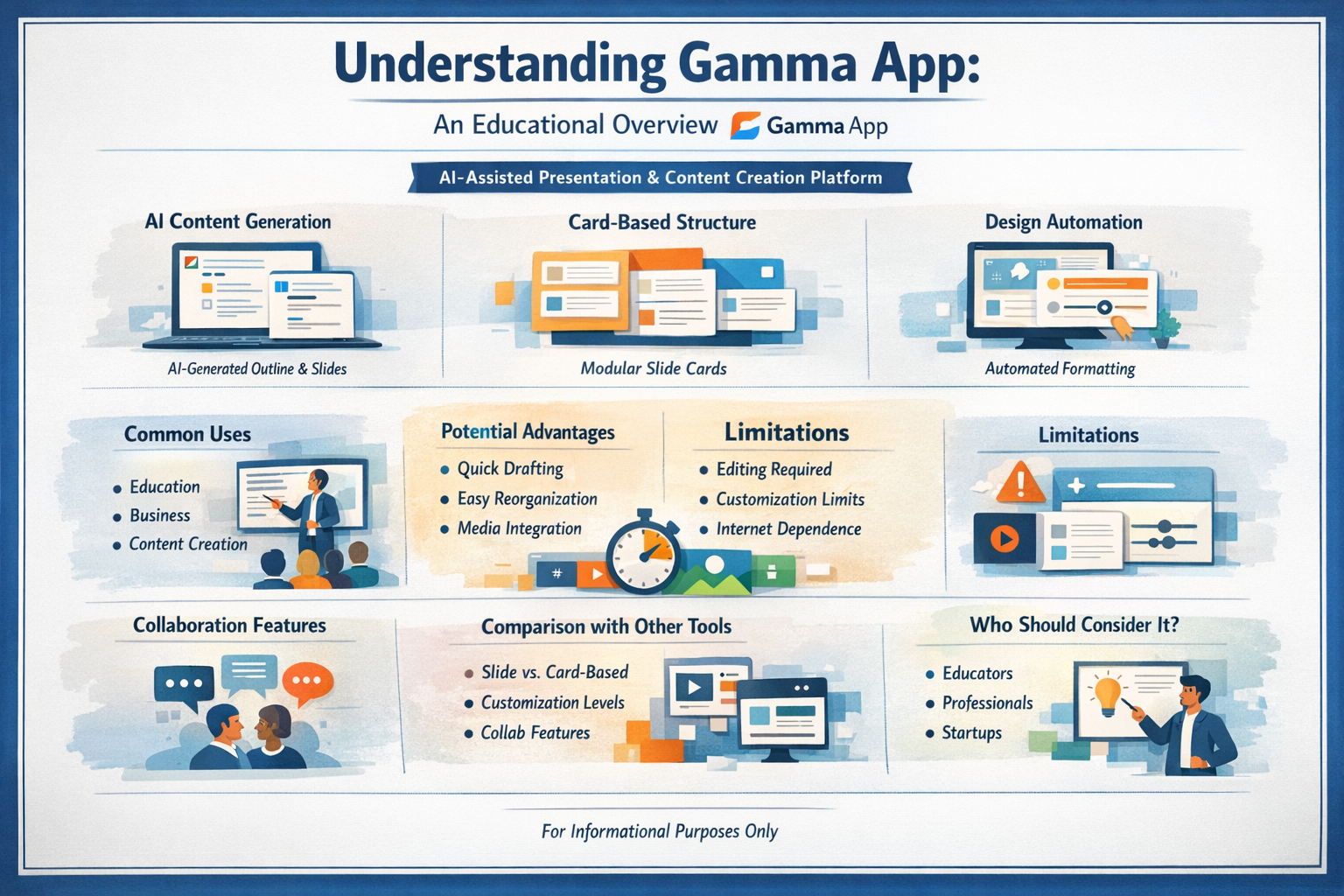
Gamma App represents part of a broader shift in productivity software toward AI-assisted content creation. By combining automated text generation, card-based presentation structure, and built-in design formatting, the platform aims to simplify the process of turning ideas into structured visual communication.
The tool is particularly oriented toward users who want to organize information quickly into presentation-like formats without extensive design work. Its automated layout systems and AI content generation features can help produce initial drafts more efficiently than traditional slide-based tools.
At the same time, users should be aware that AI-generated content often requires review and editing, and automated design systems may limit customization compared with advanced presentation software.
As AI-assisted productivity platforms continue evolving, tools like Gamma App illustrate how software design is increasingly focused on reducing friction between idea generation, writing, and visual communication.
Disclosure: This article is for educational and informational purposes only. Some links on this website may be affiliate links, but this does not influence our editorial content or evaluations.