Introduction
In digital marketing, getting visitors to take action — like signing up, purchasing, or downloading — depends heavily on how well a campaign’s landing pages perform. Many businesses struggle because standard websites aren’t optimized for specific campaigns, and building custom pages usually requires developers or designers. That’s where platforms focused on landing pages and conversion rate optimization become important: they empower marketers to create targeted pages quickly, test different approaches, and improve outcomes without heavy technical skills.
What Is Unbounce
Unbounce is a cloud‑based platform built to help marketers and teams design, test, and improve landing pages, popups, and sticky bars. Its core focus is on boosting conversions by providing tools that simplify creation, personalization, and experimentation. Unlike traditional site builders, Unbounce concentrates on individual campaign assets and conversion rate optimization rather than full websites.
How Unbounce Works
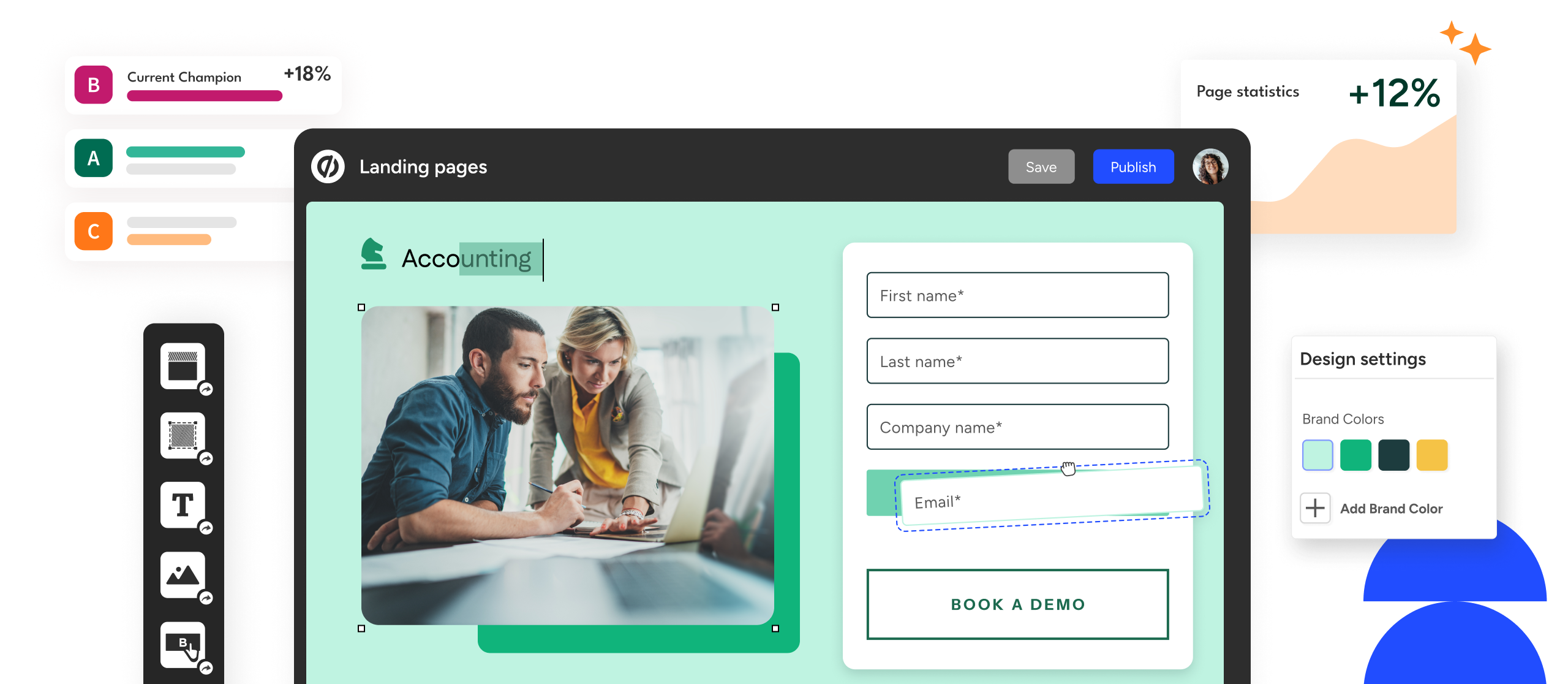
At its core, Unbounce centers on a visual, drag‑and‑drop interface that doesn’t require any coding. Marketers can start from a blank canvas or use professionally designed templates and then arrange text, images, forms, and interactive elements where they want them. Once designs are published, Unbounce offers built‑in experimentation tools such as A/B testing to compare different versions and AI‑powered routing (called Smart Traffic) that automatically sends visitors to the version most likely to convert based on behavior patterns and goals. The platform also generates dynamic text replacement so that ad‑driven campaigns can show visitors copy that matches their search terms, improving relevance and engagement.
Conversion Optimization Best Practices
Main Features with Description
Drag‑and‑Drop Landing Page Editor
Unbounce’s page builder allows users to place and modify elements like headlines, images, and forms just by clicking and dragging. This visual approach removes the need for HTML or CSS skills, so teams can quickly prototype and publish pages that reflect their brand and campaign goals.
AI‑Assisted Design and Optimization
The platform includes AI features such as Smart Traffic and built‑in copywriting tools. Smart Traffic analyzes visitor behavior and routes traffic to the landing page version with the highest likelihood of conversion, while the copy assistant helps marketers write, revise, or expand their page text.
Templates and Customization
Unbounce provides a library of more than 100 conversion‑focused templates. These templates serve as starting points tailored for purposes such as lead generation, product launches, and event registrations. Users can customize layout, fonts, colors, and imagery to align with campaign needs.
Popups and Sticky Bars for Engagement
Beyond landing pages, Unbounce lets marketers create popups and sticky bars — interactive elements that appear based on triggers like scrolling, exit intent, or time on page. These are used to capture email addresses, highlight offers, or present messages without needing additional tools.
A/B Testing and Analytics
Unbounce includes experimentation tools that let users build multiple versions of a page and distribute traffic to each version. Its reporting dashboard displays conversion data and visitor statistics, helping teams make data‑driven decisions about which designs and messages perform best.
Third‑Party Integrations
The platform supports seamless integration with popular analytics, CRM, and marketing automation systems. Through direct connections or via Zapier, leads and form data can flow into systems like Mailchimp, Salesforce, HubSpot, and others to enable automation and centralized reporting.
Publishing and Hosting
Unbounce hosts pages on its content delivery network and lets users publish directly to custom domains or integrate with CMS platforms. Hosting is included in subscription plans so there’s no need for separate servers or infrastructure.
Typical Use Cases
Teams running paid search or social ads often use Unbounce to create dedicated landing pages for each campaign, ensuring that messaging matches audience intent and landing experience is optimized for conversions. Agencies and consultants use Unbounce to manage campaigns for multiple clients, reusing templates and experimenting with variations to boost performance. It’s also useful for A/B testing different headlines, visuals, or calls to action to identify what resonates best with a particular audience.
Potential Advantages
One of Unbounce’s main benefits is the ability to build and publish conversion‑focused pages without a developer. The AI tools can automatically improve traffic allocation, and integrations reduce manual work for passing leads to other systems. Additionally, having popups and sticky bars built into the same platform means you don’t need separate software to handle different engagement touchpoints.
Limitations & Considerations
Unbounce’s pricing tends to be on the higher end compared with some other landing page builders, which can make it less suitable for very small businesses or hobby projects. Some advanced optimization tools, like split testing or AI routing, are only available in mid‑to‑higher plans, meaning you may need to upgrade to access core CRO functionality. The learning curve for mastering all features can also take time, especially for those new to conversion optimization.
Who Should Consider Unbounce
Unbounce is most suitable for marketers, agencies, and growing businesses that need precise control over campaign landing pages, CRO tools, and integration with marketing systems. If your focus is on improving conversions, running tests, and adapting messaging rapidly without code, Unbounce offers a robust set of tools.
Who Might Look Elsewhere
If your needs are primarily basic page creation for a small audience or you’re operating with a limited budget, simpler or cheaper landing page builders might be more cost‑effective. Similarly, if your campaigns are infrequent or don’t require advanced testing, you may not need Unbounce’s full suite.
Comparison With Similar Tools
Compared with general website builders, Unbounce is more focused on single‑purpose campaign pages and conversion tools. While some alternatives offer landing page creation, Unbounce’s AI traffic optimization and advanced testing differentiate it for marketers who plan to iterate frequently and squeeze more performance from paid channels.
Final Educational Summary
Unbounce is a comprehensive landing page and conversion optimization platform designed for marketing teams that want to create, test, and manage high‑performing campaign assets without coding. Its combination of visual editing, AI support, engagement tools, and analytics makes it a flexible choice for marketers, though cost and complexity should be weighed before committing.
Disclosure: This article is for educational and informational purposes only. Some links on this website may be affiliate links, but this does not influence our editorial content or evaluations.