Introduction
Modern digital environments have created a significant shift in how individuals and organizations manage daily responsibilities. Workflows that once depended on physical notebooks, printed calendars, and verbal reminders now occur across distributed devices and collaborative platforms. As remote work, digital collaboration, and personal productivity systems expanded, the complexity of task coordination increased significantly.
This shift introduced a common challenge: individuals must track multiple responsibilities across projects, timelines, and communication channels. Email threads, chat platforms, and project management systems often scatter responsibilities, making it difficult to maintain a single structured overview of tasks.
To address this issue, a category of software known as task management applications emerged. These tools aim to centralize tasks, deadlines, and priorities in a structured environment. By organizing responsibilities into lists, projects, or boards, users can maintain visibility into what needs attention and when.
Within this category, Todoist has developed recognition as a widely used task management platform designed to help individuals and teams structure work through lists, projects, and scheduling mechanisms. Its design emphasizes simplicity while supporting a range of productivity workflows.
What Is Todoist?
Todoist is a digital task management and productivity application developed to help users organize, prioritize, and track tasks across multiple devices. It operates as a cross-platform productivity system available through web browsers, desktop applications, and mobile devices.
The platform belongs to the broader productivity software and task management tools category, which focuses on helping users maintain structured task lists and project outlines.
Unlike complex project management platforms that emphasize visual boards or large team workflows, Todoist primarily focuses on structured task lists with hierarchical organization. Tasks can be grouped into projects, labeled, assigned deadlines, and filtered according to different criteria.
The underlying design of Todoist reflects a concept often discussed in productivity research: externalizing cognitive load. By storing tasks in a digital system rather than relying on memory, users reduce the mental effort required to remember pending responsibilities.
Todoist also integrates with various productivity ecosystems, allowing tasks to interact with calendars, communication tools, and workflow automation services. As a result, it can function either as a standalone task list manager or as part of a broader productivity environment.
Key Features Explained
Structured Task Organization
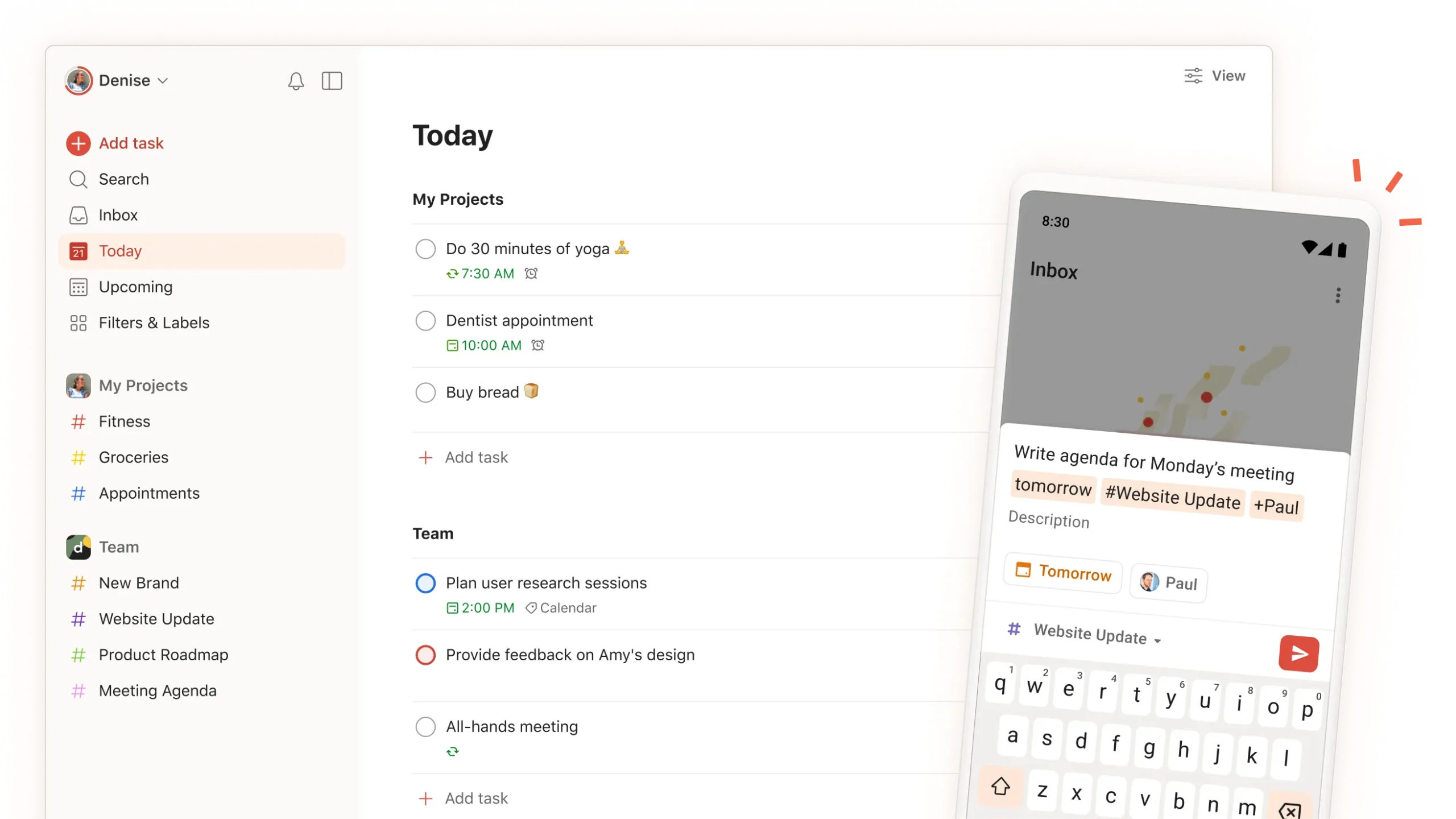
At its core, Todoist provides a hierarchical task structure. Tasks can be grouped into projects, which represent broader categories such as work assignments, personal responsibilities, or long-term goals.
Within each project, tasks can include subtasks, enabling users to break complex objectives into smaller actionable steps. This hierarchical structure allows detailed organization without requiring complicated workflow systems.
Priority Levels
Todoist supports multiple priority levels that allow tasks to be categorized according to urgency or importance. Priority indicators visually differentiate high-importance tasks from routine activities.
This feature helps users sort responsibilities and identify which items require immediate attention.
Natural Language Task Entry
One distinctive design feature in Todoist is its natural language input system. Instead of selecting multiple fields manually, users can type phrases such as:
“Submit report tomorrow at 3pm”
The software then automatically interprets elements like date, time, and task title. Natural language parsing simplifies the task entry process and reduces the time required to structure tasks.
Labels and Filters
Todoist includes a flexible labeling system that allows tasks to be categorized with descriptive tags such as:
- Work
- Personal
- Urgent
- Waiting
Labels can be combined with filters, which allow users to create dynamic views of tasks based on specific conditions. For example, users may create filters that display:
- Tasks due today
- High-priority work tasks
- Tasks assigned to specific collaborators
These filters enable customizable task views tailored to different workflows.
Recurring Task Scheduling
Many responsibilities occur regularly, such as weekly meetings or monthly reports. Todoist supports recurring tasks, allowing tasks to automatically repeat based on defined intervals.
Examples include:
- Daily reminders
- Weekly meetings
- Monthly administrative reviews
Recurring scheduling helps automate repetitive task tracking.
Cross-Platform Synchronization
Todoist operates across multiple platforms including:
- Web applications
- Desktop environments
- Mobile devices
Tasks synchronize automatically, ensuring that updates made on one device appear on others. Cross-platform synchronization is essential for modern productivity tools, particularly for individuals working across devices during the day.
Collaboration Features
Although Todoist is widely used for personal task management, it also supports collaborative projects. Within shared projects, users can:
- Assign tasks to other members
- Add comments
- Attach files
- Track task completion
These collaborative functions allow small teams to coordinate tasks without requiring large project management systems.
Productivity Tracking
Todoist includes a productivity tracking feature that visualizes task completion patterns over time. Users can observe how consistently tasks are completed and how activity changes across days or weeks.
Such tracking systems reflect a broader productivity research concept known as behavioral reinforcement, where visual progress indicators encourage consistent engagement with task lists.
Common Use Cases
Personal Productivity Management
Many individuals use Todoist to manage everyday responsibilities such as errands, appointments, and personal goals. By storing tasks in a structured system, users avoid relying on memory for routine obligations.
Freelance and Independent Work
Freelancers often juggle multiple clients and projects simultaneously. Todoist allows independent professionals to maintain separate project lists for different clients while tracking deadlines and deliverables.
Small Team Coordination
Although not designed as a large enterprise project management system, Todoist supports collaborative task lists that small teams may use for internal coordination.
Examples include:
- Marketing campaign tasks
- Content production schedules
- Event planning checklists
Academic Task Organization
Students frequently manage coursework across several subjects simultaneously. Todoist can organize:
- Assignment deadlines
- Study schedules
- Exam preparation tasks
The ability to categorize tasks by course or topic can help maintain academic organization.
Habit and Routine Tracking
Recurring tasks allow users to track regular activities such as:
- Exercise routines
- Daily planning
- Reading goals
While Todoist is not specifically a habit-tracking application, its recurring task functionality can support routine management.
Potential Advantages
Simplicity of Interface
One frequently discussed advantage of Todoist is its minimal interface design. The software emphasizes structured lists rather than complex dashboards.
This approach can reduce learning barriers for users unfamiliar with advanced productivity systems.
Flexible Task Organization
Todoist provides multiple ways to categorize tasks, including:
- Projects
- Subtasks
- Labels
- Priority levels
- Filters
The combination of these elements allows users to design workflows that match different productivity styles.
Cross-Device Accessibility
Because tasks synchronize across devices, users can update task lists from smartphones, laptops, or tablets without losing information.
This accessibility supports productivity across different working environments.
Integration With Digital Ecosystems
Todoist can connect with various digital tools used in modern workflows, including calendar services, automation platforms, and communication software.
Integrations allow tasks to move between systems rather than existing in isolation.
Structured Task Visualization
The list-based structure used by Todoist provides a clear overview of responsibilities. Some users prefer lists over visual boards because they resemble traditional written task lists while adding digital flexibility.
Limitations & Considerations
Limited Visual Project Mapping
Compared with visual project management systems that rely on kanban boards or timeline charts, Todoist focuses primarily on lists.
Users who prefer visual workflow mapping may find the list-based structure less suitable for complex projects.
Collaboration Depth
Although Todoist supports shared projects and task assignments, it does not offer the extensive team management capabilities found in enterprise project management software.
Large teams managing complex workflows may require more specialized platforms.
Learning Curve for Advanced Features
Basic task entry in Todoist is simple, but features such as filters, labels, and advanced task organization may require time to fully understand.
Users unfamiliar with productivity frameworks might initially underuse these features.
Dependence on Structured Input
The effectiveness of Todoist depends largely on consistent task entry. If users do not regularly record tasks, the system may not accurately represent their responsibilities.
This limitation is common among many productivity tools.
Who Should Consider Todoist
Todoist may be relevant for several types of users:
Individual professionals managing multiple projects or deadlines.
Students organizing coursework, study sessions, and academic schedules.
Freelancers and independent workers coordinating tasks across multiple clients.
Small teams seeking lightweight task coordination without adopting complex project management systems.
Productivity enthusiasts interested in structured task list systems.
These groups often benefit from digital task organization tools that maintain clarity across daily responsibilities.
Who May Want to Avoid It
While Todoist fits many productivity scenarios, it may not align with every workflow.
Users who might look for alternative tools include:
Large organizations requiring enterprise project management systems.
Teams needing visual workflow boards with extensive automation features.
Users seeking built-in time tracking or resource planning systems.
Individuals who prefer calendar-only planning instead of task lists.
These scenarios may require different categories of productivity software.
Comparison With Similar Todoist
The task management software landscape includes several platforms with overlapping functionality. Todoist differs from other tools in design emphasis and feature complexity.
For example, some task management platforms focus on visual boards and drag-and-drop task movement, which may suit agile team workflows.
Other productivity systems integrate note-taking, databases, and documentation alongside task tracking.
In contrast, Todoist maintains a task-centric architecture, prioritizing list-based organization rather than multi-purpose workspace environments.
This design makes it particularly suitable for users who prefer a focused task list experience rather than a multifunction productivity platform.
Another distinguishing aspect is the natural language task entry system, which simplifies task creation compared with tools that require manual date selection and field entry.
These structural differences illustrate how productivity tools often reflect distinct workflow philosophies.
Final Educational Summary
Digital productivity environments require systems that can manage increasing numbers of responsibilities across professional and personal contexts. Task management software emerged to address this need by providing structured methods for organizing tasks, deadlines, and priorities.
Todoist represents one approach within this category. Its design focuses on structured task lists, hierarchical organization, and cross-platform accessibility. Through features such as projects, labels, priority levels, recurring scheduling, and collaborative task sharing, the platform enables users to maintain organized task systems.
However, Todoist’s emphasis on simplicity also means that it lacks some of the advanced visual planning and large-scale collaboration features present in enterprise project management platforms.
Understanding the role of tools like Todoist requires examining broader productivity challenges: cognitive overload, fragmented workflows, and distributed work environments. Task management platforms attempt to reduce these challenges by externalizing tasks into organized digital systems.
As digital work continues to evolve, structured task management software remains a fundamental component of modern productivity infrastructure.
Disclosure:
Disclosure: This article is for educational and informational purposes only. Some links on this website may be affiliate links, but this does not influence our editorial content or evaluations.