Introduction
Email remains one of the most important communication tools for work and personal use, yet managing a crowded inbox can quickly become overwhelming. Notifications, promotional messages, updates, and conversations often arrive at the same time, making it difficult to identify which emails truly require attention.
Many users attempt to solve this problem using folders or manual filters, but these solutions usually require ongoing maintenance. SaneBox introduces a different approach by automatically organizing emails based on user behavior and message importance. Instead of changing how email works, it improves the existing inbox experience through background automation.
What Is SaneBox?
SaneBox is an email organization service that connects to an existing email account and sorts incoming messages using intelligent analysis. It studies how users interact with emails — such as which messages are opened, ignored, or replied to — and uses that information to prioritize future emails.
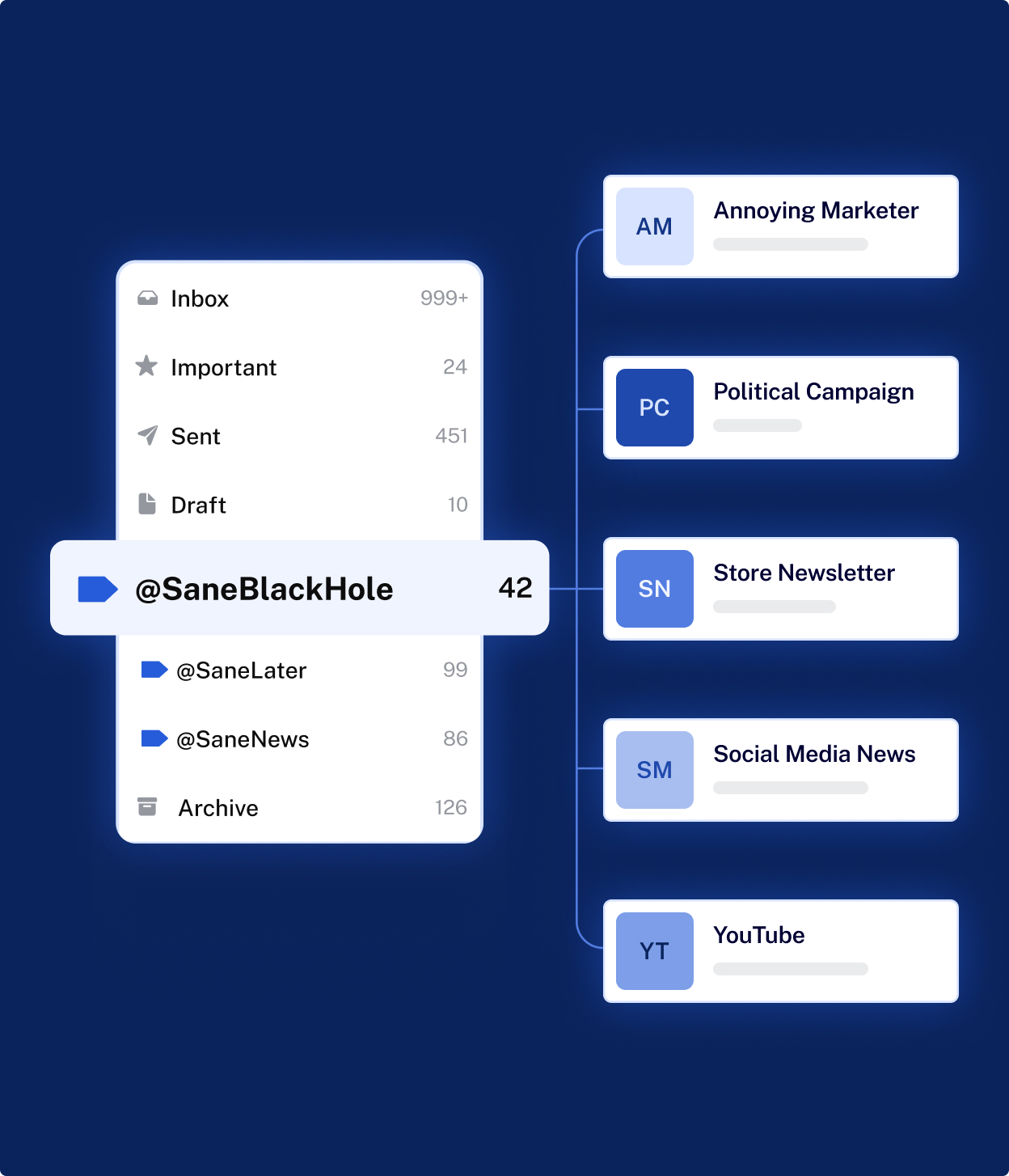
The service does not replace your email provider or require a new application. Once connected, it creates smart folders inside your current inbox where emails are automatically categorized. Important emails remain visible, while less urgent messages are moved out of immediate focus.
Its purpose is to help users spend less time managing emails manually while still maintaining full control over their inbox.
Key Features Explained
Automatic Priority Filtering
SaneBox analyzes incoming emails and separates them according to relevance. Messages considered less urgent are moved into folders like SaneLater, allowing the main inbox to display only higher-priority conversations.
The system improves accuracy over time as users correct or move emails, gradually learning individual communication patterns without complex setup.
Follow-Up Tracking
Email conversations sometimes require responses that can easily be forgotten. SaneBox includes reminder options that return emails to the inbox if no reply is received within a selected period.
This feature supports better communication management by ensuring important emails do not disappear among newer messages.
Blocking Unwanted Emails
Managing subscriptions manually can be time-consuming. SaneBox simplifies this process by allowing users to send unwanted emails to a special filtering folder. Future messages from those senders are automatically excluded from the inbox.
This method helps reduce repeated promotional emails and unnecessary notifications without complicated unsubscribe procedures.
Snooze Functionality
Not every email needs immediate action. SaneBox allows users to temporarily hide emails and schedule their return at a later time. This creates a more task-focused workflow where only current priorities remain visible.
Snoozing emails helps reduce distraction while keeping messages accessible when needed.
Daily Summary Reports
Instead of constantly checking secondary folders, users receive periodic summaries showing low-priority emails collected during the day. These digests allow quick review and decision-making without opening multiple folders.
This structured overview encourages intentional email checking rather than continuous inbox monitoring.
Inbox Cleanup Tools
Over time, inboxes accumulate thousands of old messages. SaneBox includes cleanup assistance that helps identify outdated emails or large groups of messages that can be removed together, improving storage management.
Compatibility With Existing Email Services
A key characteristic of SaneBox is that it works alongside existing email platforms. Users continue using Gmail, Outlook, or other providers while SaneBox performs organization tasks behind the scenes through folders and labels.
Common Use Cases
SaneBox is frequently used by professionals who handle large volumes of communication each day. Business owners managing clients may rely on automatic prioritization to ensure urgent emails remain visible. Freelancers and consultants often use reminder features to track ongoing discussions.
Remote teams, customer-facing roles, and individuals balancing multiple projects may also benefit from separating updates and newsletters from direct communication. Personal users seeking a more structured inbox experience can use it to reduce digital clutter.
Potential Advantages
One of the main advantages of SaneBox is reduced inbox noise. By limiting visible emails to those considered important, users may experience improved focus and less time spent scanning messages.
The adaptive learning system removes the need for complex filtering rules, and compatibility with existing email services avoids workflow disruption. Automation gradually improves organization without requiring technical knowledge.
Limitations & Considerations
Automated systems require an adjustment period. During early use, users may need to review sorted folders regularly while the system learns preferences.
Some individuals may prefer manual control over email organization and may find automated sorting less predictable. Additionally, since the service operates on a subscription model, users must consider whether ongoing usage aligns with their needs.
Who Should Consider SaneBox
SaneBox may be suitable for users who regularly receive large numbers of emails and struggle to maintain organization manually. Professionals, freelancers, entrepreneurs, and remote workers managing frequent communication may benefit most.
It can also help individuals who want inbox organization without switching email platforms or learning new software.
Who May Want to Avoid It
Users with minimal email activity or already well-organized inbox systems may not require additional automation. Those who prefer fully manual sorting methods may also find traditional filters sufficient.
Comparison With Similar Tools
Standard email filters rely on predefined rules that must be created and updated manually. SaneBox differs by adapting automatically based on user behavior, reducing ongoing maintenance.
Unlike dedicated email applications that replace existing inboxes, SaneBox acts as an enhancement layer, allowing users to maintain familiar workflows while improving organization.
Final Educational Summary
SaneBox provides an automated method for organizing email communication without changing how users access their inbox. Through intelligent sorting, reminders, sender blocking, and structured summaries, it aims to simplify daily email management.
Its effectiveness depends on email volume and user preference for automation. For individuals experiencing inbox overload, SaneBox offers a systematic way to prioritize communication while maintaining a familiar email environment.
Disclosure
This article is created for informational and educational purposes only. It presents an independent explanation without promotional intent, sponsorship involvement, or affiliate influence. Platform features may change over time as updates are introduced.