Introduction
Modern communication depends heavily on email, yet managing a crowded inbox remains a daily challenge. Important conversations often get buried under newsletters, notifications, and automated updates. Even with built-in filters, users still spend significant time sorting messages manually.
SaneBox is an email management service created to simplify inbox organization through intelligent automation. Instead of asking users to switch email platforms, it connects to existing accounts and restructures incoming messages based on priority. The aim is to reduce distraction while keeping essential communication visible and easy to manage.
What Is SaneBox?
SaneBox is an AI-assisted email organization tool that analyzes user email behavior to determine which messages are important. It integrates directly with popular email providers such as Gmail, Outlook, and other IMAP-supported services without replacing the original inbox.
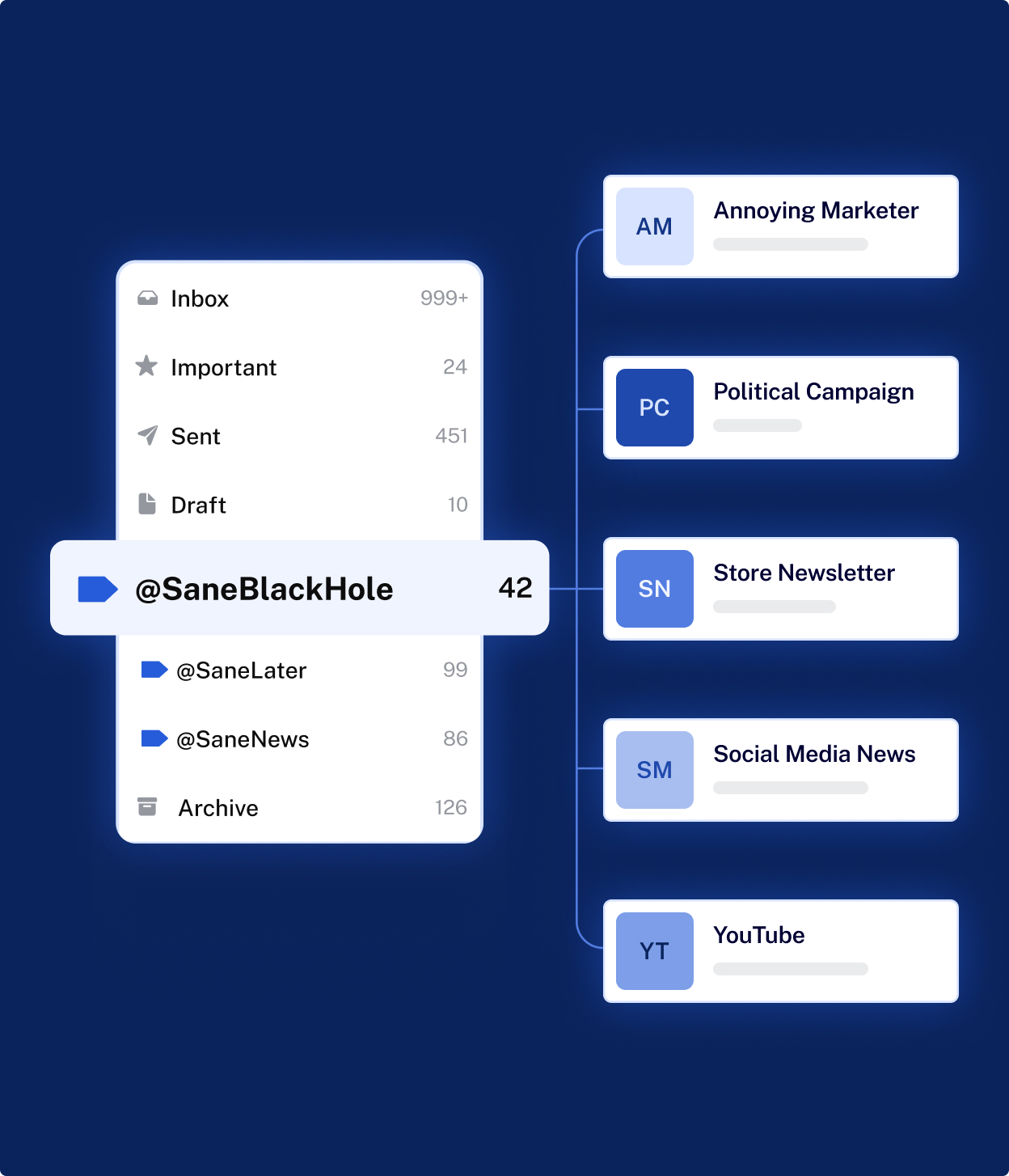
After connecting an account, the system creates smart folders that automatically separate emails according to relevance. High-priority emails stay in the main inbox, while less urgent messages are moved into secondary folders for later review.
The platform operates quietly in the background, allowing users to continue using their existing email apps exactly as before.
Key Features Explained
Intelligent Email Prioritization
SaneBox automatically evaluates incoming emails by studying how users interact with senders and messages. Emails that appear less urgent are moved into folders like SaneLater, reducing clutter in the primary inbox.
As users move emails between folders, the system learns preferences and improves sorting accuracy over time. This adaptive learning approach minimizes the need for manual rules.
Reminder and Follow-Up System
Managing unanswered emails can be difficult when conversations span several days. SaneBox includes reminder folders that allow users to set follow-up alerts directly from emails.
If a reply is not received within a chosen timeframe, the message returns to the inbox as a reminder, helping prevent missed responses or forgotten discussions.
Automatic Unsubscribe Control
Frequent promotional emails and newsletters can slowly overwhelm an inbox. SaneBox provides a dedicated folder that permanently filters unwanted senders.
Once an email is placed into this folder, future messages from that sender are automatically blocked, helping maintain a cleaner inbox without visiting individual unsubscribe pages.
Email Snoozing for Better Focus
Users can temporarily remove emails from view using snooze functionality. Messages reappear later at a selected time or date, allowing users to focus on immediate tasks without deleting or archiving information.
This feature supports task-based email management rather than constant inbox monitoring.
Digest Summaries
Instead of repeatedly checking secondary folders, SaneBox delivers summary reports listing low-priority emails collected throughout the day. Users can review multiple messages quickly and decide whether to keep or remove them.
This reduces unnecessary inbox checking and supports structured email review habits.
Inbox Cleanup Assistance
Older emails and large message groups can accumulate over time. SaneBox offers cleanup tools that help identify outdated or unnecessary emails, allowing users to delete them in batches and reclaim storage space.
Works Across Existing Email Platforms
A notable aspect of SaneBox is that it does not require downloading new software or learning a new interface. All organization appears inside the user’s current email environment through folders or labels automatically created by the service.
Common Use Cases
SaneBox is commonly used by individuals dealing with heavy communication workloads. Professionals managing client communication benefit from automatic prioritization that highlights urgent messages. Freelancers often use reminders to track ongoing conversations without maintaining manual task lists.
Remote workers and consultants handling multiple projects may also use it to separate updates, promotions, and direct communication into structured categories. Even personal users aiming for a cleaner inbox may find value in automated sorting.
Potential Advantages
One major advantage of SaneBox is time efficiency. By reducing the number of emails visible in the main inbox, users can focus attention on conversations that matter most. The learning system adapts gradually, meaning organization improves without constant configuration.
Another benefit is compatibility. Because users keep their existing email provider, there is no migration process or workflow disruption. Automation also helps reduce mental overload caused by continuous email notifications.
Limitations & Considerations
Although automation is helpful, it may require an adjustment period. Users initially need to review sorted folders to ensure important emails are not misplaced while the system learns preferences.
Those who prefer strict manual control may find automated sorting less predictable. Additionally, as a subscription-based service, ongoing cost may influence long-term adoption decisions for some users.
Who Should Consider SaneBox
SaneBox may be useful for individuals who receive a high volume of daily emails and struggle to maintain organization manually. Professionals, entrepreneurs, freelancers, and remote teams handling frequent communication may benefit from automated prioritization and reminder tools.
Users seeking a structured inbox without changing email platforms are also likely to find it suitable.
Who May Want to Avoid It
The service may not be necessary for users who receive only a small number of emails or already maintain an organized inbox using simple filters. Individuals who prefer fully manual inbox control may also prefer traditional email management methods.
Comparison With Similar Tools
Traditional email filters rely on predefined rules such as keywords or specific senders. SaneBox differs by learning from user behavior rather than fixed conditions, allowing sorting to evolve naturally over time.
Compared with alternative email applications that require switching platforms, SaneBox functions as an enhancement layer added to existing email services, which reduces learning effort and workflow disruption.
Final Educational Summary
SaneBox is designed to simplify email management through intelligent automation rather than manual organization. By prioritizing important messages, providing reminders, blocking unwanted senders, and offering structured summaries, it helps users maintain a cleaner inbox environment.
Its usefulness depends largely on email volume and user preference for automation. For individuals facing constant inbox overload, SaneBox presents a systematic approach to reducing clutter while preserving familiar email workflows.
Disclosure
This content is prepared purely for informational and educational purposes. It is an independent explanation created without sponsorship, promotion, or affiliate intent. Features described are based on publicly available information and may change as the service evolves.