Introduction
Modern work environments increasingly rely on distributed teams, asynchronous communication, and digital-first workflows. As organizations move away from centralized offices, the need for tools that replicate collaborative thinking processes—such as brainstorming on whiteboards or mapping ideas visually—has grown significantly. Traditional communication tools like email and messaging platforms often fall short when it comes to visual collaboration, ideation, and real-time co-creation.
This gap has led to the rise of digital whiteboard platforms, which aim to simulate and extend the experience of physical collaboration spaces. These tools provide shared canvases where individuals and teams can visualize concepts, organize information, and collaborate dynamically. Among the platforms in this category, Miro has emerged as a widely recognized solution designed to support visual collaboration across diverse professional contexts.
What Is Miro?
Miro is a cloud-based digital whiteboard platform that enables users to collaborate visually in real time or asynchronously. It belongs to the broader category of online collaboration tools and visual workspace software. The platform provides an infinite canvas where users can create diagrams, workflows, mind maps, and other visual artifacts.
Primarily used in team-based environments, Miro supports collaborative ideation, project planning, and process mapping. It integrates with various productivity tools and is accessible through web browsers as well as desktop and mobile applications. The platform is designed to accommodate both structured workflows and open-ended brainstorming sessions.
From an industry perspective, Miro sits at the intersection of visual collaboration software, remote work tools, and project management support systems.
Key Features Explained
Infinite Canvas for Visual Thinking
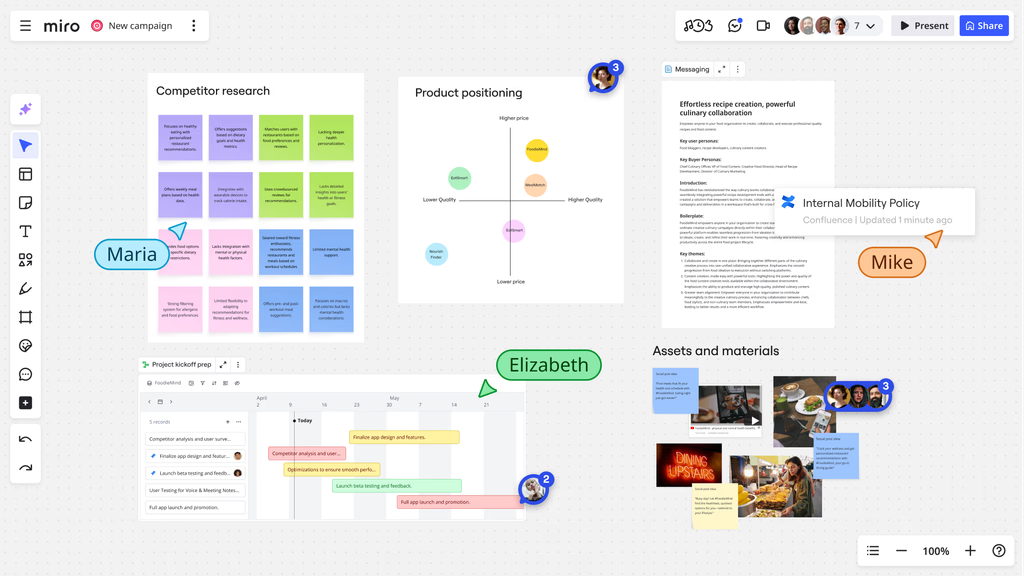
One of the defining aspects of Miro is its infinite canvas. Unlike traditional document-based tools, the canvas allows users to expand their workspace without predefined limits. This flexibility supports large-scale brainstorming sessions, complex diagrams, and multi-layered workflows.
Users can zoom in and out, navigate freely, and organize content spatially, which helps replicate the experience of working on a physical whiteboard.
Real-Time Collaboration Capabilities
Miro enables multiple users to interact on the same board simultaneously. Participants can add content, edit elements, and leave comments in real time. Visual indicators such as cursors and user avatars help track activity across the board.
This feature is particularly relevant for remote teams that require synchronous collaboration without physical proximity.
Pre-Built Templates and Frameworks
The platform includes a wide range of templates designed for different use cases. These templates cover areas such as:
- Agile workflows (e.g., sprint planning boards)
- Design thinking frameworks
- Business model canvases
- Mind mapping structures
Templates reduce the need to build layouts from scratch and provide structured starting points for various activities.
Integration With Other Tools
Miro supports integration with commonly used software tools, including project management systems, communication platforms, and cloud storage services. These integrations allow users to embed files, import data, and connect workflows across platforms.
Examples of integrations include task management tools, video conferencing platforms, and document-sharing services.
Visual Collaboration Elements
The platform offers a variety of visual components, such as:
- Sticky notes
- Shapes and connectors
- Flowcharts
- Images and icons
- Text blocks
These elements can be combined to create complex visual representations of ideas, processes, and systems.
Facilitation Tools for Workshops
Miro includes features that support structured collaboration sessions, such as:
- Timer functionality
- Voting tools
- Presentation mode
- Frames for organizing content
These tools are particularly useful in workshops, team meetings, and design sprints.
Common Use Cases
Remote Team Collaboration
Organizations with distributed teams often use Miro as a shared workspace for meetings and collaborative sessions. It helps replace physical whiteboards and enables participants to contribute regardless of location.
Brainstorming and Ideation
Creative teams use Miro to generate and organize ideas visually. The flexibility of the canvas allows for free-form thinking, clustering of concepts, and iterative refinement.
Agile Project Planning
In software development and product management, Miro is used to map user stories, plan sprints, and visualize workflows. It supports methodologies such as Scrum and Kanban through customizable boards.
UX and Design Workflows
Design teams use Miro for wireframing, journey mapping, and user experience planning. It allows stakeholders to collaborate on design concepts without needing specialized design software.
Educational and Training Environments
Educators and trainers use Miro to create interactive learning experiences. It can be used for group activities, visual explanations, and collaborative exercises in both academic and corporate training settings.
Process Mapping and Documentation
Businesses use Miro to document workflows, map organizational processes, and visualize systems. This is particularly useful for operations teams and business analysts.
Potential Advantages
Supports Visual Learning and Thinking
Miro’s visual approach aligns with cognitive processes that benefit from spatial organization and imagery. It can help users better understand complex relationships and structures.
Enhances Team Engagement
Interactive elements such as sticky notes, voting tools, and real-time editing can increase participation during collaborative sessions. This is especially relevant in remote environments where engagement can be more difficult to maintain.
Flexible Across Disciplines
The platform is not limited to a specific industry or function. It can be adapted for use in design, engineering, education, marketing, and more.
Facilitates Asynchronous Work
In addition to real-time collaboration, Miro allows users to contribute at different times. Comments, annotations, and persistent boards enable ongoing collaboration without requiring simultaneous participation.
Centralized Workspace
Miro can act as a central hub for visual content, reducing the need to switch between multiple tools for brainstorming and planning activities.
Limitations & Considerations
Learning Curve for New Users
While Miro offers a wide range of features, new users may find the interface complex initially. Understanding how to navigate the canvas and use advanced tools can require time and practice.
Performance With Large Boards
Boards with extensive content may experience performance issues, especially on lower-end devices or slower internet connections. This can affect usability during large-scale projects.
Dependency on Internet Connectivity
As a cloud-based platform, Miro requires a stable internet connection. Offline functionality is limited, which may be a constraint in certain environments.
Potential Overuse of Visual Elements
The flexibility of the platform can sometimes lead to overly complex boards. Without clear structure, visual clutter may reduce clarity rather than enhance it.
Data Privacy and Security Considerations
Organizations handling sensitive information may need to evaluate Miro’s data handling policies and compliance features before adopting the platform.
Who Should Consider Miro
Distributed Teams
Teams working across different locations can benefit from a shared visual workspace that supports both synchronous and asynchronous collaboration.
Product and Development Teams
Professionals involved in product development, software engineering, and agile workflows may find Miro useful for planning and coordination.
Educators and Facilitators
Teachers, trainers, and workshop facilitators can use Miro to create interactive and engaging learning environments.
Designers and Creative Professionals
Individuals working in design, user experience, and creative fields may appreciate the platform’s flexibility for visual exploration and collaboration.
Business Analysts and Strategists
Those involved in process mapping, strategic planning, and organizational design can use Miro to visualize complex systems and workflows.
Who May Want to Avoid It
Users Seeking Simple Note-Taking Tools
Individuals who require basic note-taking or document editing may find Miro unnecessarily complex for their needs.
Environments With Limited Internet Access
Since Miro relies heavily on cloud connectivity, it may not be suitable for settings where internet access is unreliable.
Teams With Strict Data Compliance Requirements
Organizations operating under strict regulatory frameworks may need to carefully assess whether Miro meets their compliance standards.
Users Unfamiliar With Visual Workflows
Those who prefer linear, text-based approaches to work may find the visual nature of Miro less intuitive.
Comparison With Similar Tools
Miro operates within a competitive landscape that includes other digital whiteboard and collaboration platforms. Tools such as Microsoft Whiteboard, MURAL, and FigJam offer similar functionalities but differ in design philosophy, feature sets, and integration ecosystems.
Microsoft Whiteboard is often integrated within the Microsoft ecosystem, making it suitable for organizations already using Microsoft 365. However, it may offer fewer advanced collaboration features compared to Miro.
MURAL focuses on structured collaboration and facilitation, with an emphasis on guided workflows. While it shares similarities with Miro, differences may be found in interface design and template availability.
FigJam, developed by Figma, is closely tied to design workflows and may appeal more to design teams already using Figma for interface design. Its simplicity can be advantageous for certain use cases but may lack some of the broader capabilities found in Miro.
In comparison, Miro is often noted for its extensive template library, flexible canvas, and broad applicability across industries.
Final Educational Summary
Miro represents a category of tools designed to address the challenges of visual collaboration in distributed and digital work environments. By providing an infinite canvas, real-time interaction capabilities, and a wide range of visual elements, it enables teams to replicate and expand upon traditional whiteboard-based workflows.
Its strengths lie in flexibility, adaptability, and support for diverse use cases, ranging from brainstorming sessions to structured project planning. However, these strengths are accompanied by considerations such as a learning curve, performance limitations with large boards, and reliance on internet connectivity.
For organizations and individuals seeking a visual approach to collaboration, Miro offers a comprehensive set of features. At the same time, its suitability depends on specific needs, technical environments, and user preferences.
Disclosure: This article is for educational and informational purposes only. Some links on this website may be affiliate links, but this does not influence our editorial content or evaluations.