Introduction
Email remains a core communication tool for individuals and businesses, but concerns around privacy, ads, and data usage have led many users to explore alternatives to traditional free providers. Services that focus on paid, privacy-oriented email aim to address these concerns while offering additional productivity features.
Fastmail is one such platform, positioned as a subscription-based email service that emphasizes user control, customization, and integrated productivity tools.
What Is Fastmail?
Fastmail is an email hosting service that provides users with private email accounts, along with integrated calendars, contacts, and file storage. Unlike many free email providers, it operates on a paid model and does not rely on advertising or data mining for revenue.
The platform supports access via web browsers, mobile apps, and third-party email clients such as Outlook or Thunderbird. It also allows users to create custom email addresses using their own domains.
Key Features Explained
Private Email Without Ads
Fastmail offers an ad-free inbox experience. The service states that it does not track users or scan emails for advertising purposes, which differentiates it from many free alternatives.
Custom Domains and Multiple Addresses
Users can create email addresses using personal or business domains. Additionally, multiple email aliases can be configured within a single account, making it easier to manage different identities or use cases.
Masked Email for Privacy
A “masked email” feature allows users to generate temporary or hidden email addresses. These can be used for sign-ups or logins, helping reduce exposure of the primary email address.
Integrated Calendar and Contacts
Fastmail includes built-in calendar and contact management tools. These are designed to work alongside email for scheduling, event sharing, and contact organization within one interface.
Storage Options
Plans typically include a combination of email, calendar, and file storage. For example, individual plans may include around 50 GB for mail data and additional file storage, with options to expand if needed.
Productivity Tools
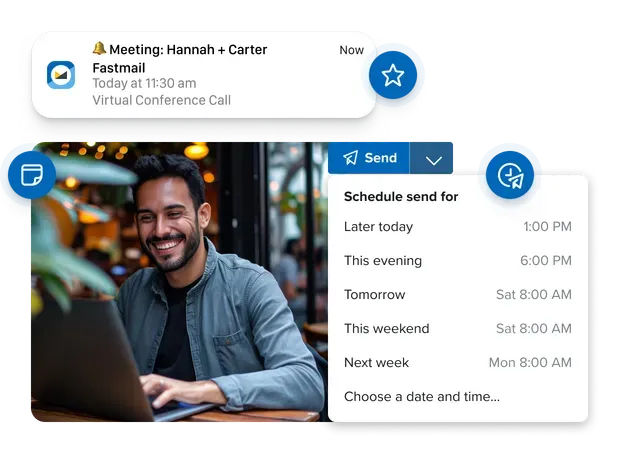
Features such as scheduled send, snooze, and email filtering rules are included to help manage inbox workflow. Offline access is also supported for reading and drafting emails.
Common Use Cases
Personal Email Replacement
Individuals looking to move away from ad-supported email services may use Fastmail as their primary inbox, especially if privacy is a concern.
Custom Domain Email
Freelancers, professionals, or small teams often use it to create branded email addresses without managing their own mail servers.
Family Email Management
Family plans allow multiple users under one account, with shared storage and optional shared calendars.
Business Communication
Small businesses may use Fastmail for team email, shared contacts, and administrative controls over user accounts.
Potential Advantages
Privacy-Focused Approach
Because Fastmail is a paid service, it does not depend on advertising, which can reduce concerns about data usage and tracking.
Flexible Access
The ability to use Fastmail with third-party email apps provides flexibility for users who prefer familiar tools.
Customization and Control
Support for domains, aliases, and filtering rules allows users to tailor their email setup to specific workflows.
Integrated Ecosystem
Combining email, calendar, contacts, and file storage in one platform can simplify digital organization.
Limitations & Considerations
Paid Subscription Required
Unlike free email providers, Fastmail requires a subscription after a trial period, which may not suit all users.
Not End-to-End Encrypted by Default
While Fastmail offers strong security practices, it does not provide built-in end-to-end encryption in the same way as some specialized privacy-focused services.
Learning Curve for Advanced Features
Features like custom domains, aliases, and filtering rules may require initial setup and technical understanding.
Storage Limits
Although storage is relatively generous, users with very large email archives or file needs may need to upgrade plans.
Who Should Consider Fastmail
- Individuals seeking an ad-free, privacy-conscious email service
- Professionals or freelancers needing custom domain email
- Users who prefer simple, integrated tools over multiple separate apps
- Small teams requiring basic email and calendar collaboration
Who May Want to Avoid It
- Users looking for completely free email solutions
- Those requiring built-in end-to-end encryption for highly sensitive communication
- Individuals who prefer minimal setup without managing domains or aliases
Comparison With Similar Tools
Compared to mainstream services like Gmail, Fastmail offers more privacy and fewer ads but lacks deep integration with large ecosystems like Google Workspace.
When compared to privacy-focused services such as Proton Mail, Fastmail may offer more flexibility and features, but Proton Mail places stronger emphasis on encryption and security-first design.
Final Educational Summary
Fastmail represents a different approach to email by prioritizing user privacy, customization, and a subscription-based model. It combines email with calendar, contacts, and storage features in a single platform, making it suitable for users who prefer an integrated system.
However, the requirement for a paid plan and the absence of default end-to-end encryption are important factors to evaluate depending on individual needs.
Disclosure
This content is for educational and informational purposes only. It is written in a neutral, independent tone without promotional intent. Features and specifications may change over time, and users should review official documentation before making decisions.