
Introduction
Modern content creation demands speed, clarity, and efficiency. Whether you are producing podcasts, YouTube videos, online courses, or business presentations, editing can quickly become time-consuming—especially when using traditional timeline-based software.
Descript approaches editing differently. Instead of requiring users to cut and trim clips manually across complex timelines, it allows them to edit audio and video by modifying text transcripts. This shift in workflow has made it popular among creators who prioritize communication-driven content.
This guide provides a detailed, neutral overview of Descript, covering its features, working model, pricing structure, advantages, limitations, and practical use cases.
What Is Descript?
Descript is an all-in-one audio and video editing platform built around speech recognition and AI automation. The software automatically transcribes uploaded recordings and converts them into editable text. Users can then delete, rearrange, or modify text to make changes to the corresponding audio or video.
Rather than focusing heavily on cinematic effects or advanced visual production tools, Descript is primarily designed for spoken-word content such as interviews, tutorials, webinars, training sessions, and podcasts.
How Descript Works
The workflow typically follows these steps:
- Upload an audio or video file.
- The system generates a transcript automatically.
- The transcript becomes the primary editing interface.
- Deleting text removes the matching audio/video segment.
- AI tools can enhance sound quality or remove filler words.
- Final content can be exported in multiple formats.
This structure simplifies the editing process for users who are more comfortable working with text than complex video timelines.
Core Features Explained in Detail
Text-Based Editing System
Descript’s most defining feature is its text-driven editing method. After transcription, every spoken word becomes editable. If a speaker makes a mistake or repeats a sentence, users can remove that section by simply deleting the words in the transcript. The software automatically adjusts the audio and video timeline in the background.
This approach reduces manual cutting and makes editing interviews or long conversations significantly faster.
Automatic Transcription and Caption Creation
The platform includes built-in transcription that converts speech into text within minutes. Once generated, users can:
- Correct transcription errors manually
- Highlight key phrases
- Generate subtitles
- Export captions for external platforms
Captions are increasingly important for accessibility and social media engagement, making this feature valuable for digital creators.
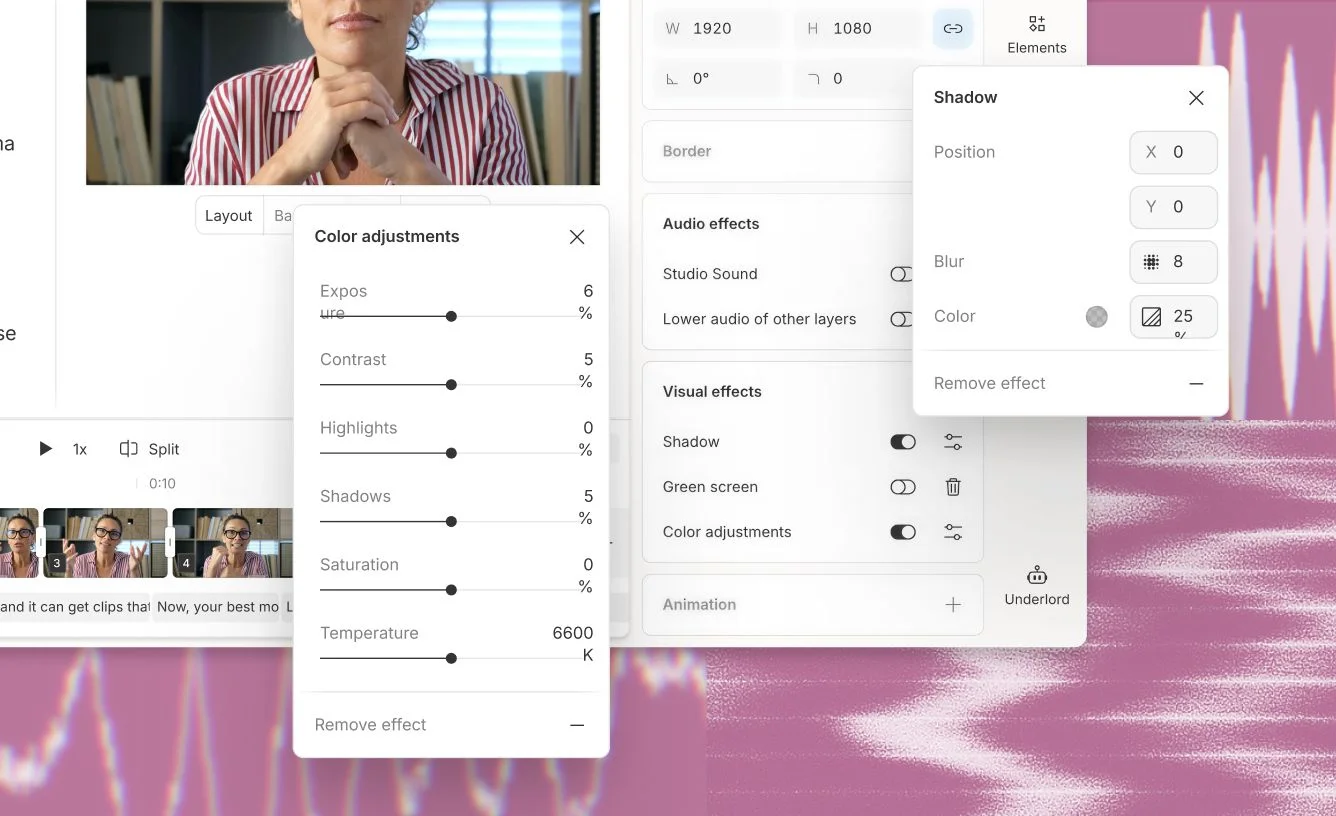
Studio Sound Audio Enhancement
Studio Sound is an AI-driven audio improvement tool integrated into Descript. It enhances recordings by:
- Reducing background noise
- Improving voice clarity
- Balancing uneven audio levels
- Minimizing echo
This is particularly helpful for creators recording in home environments without professional audio equipment.
Filler Word Detection and Removal
In natural speech, filler words such as “um,” “uh,” and “like” are common. Descript identifies these automatically and allows users to remove them in bulk or individually. Instead of manually searching through long recordings, creators can clean up conversations in a fraction of the usual time.
Overdub (AI Voice Editing)
Overdub enables users to generate a synthetic version of their voice. Once trained, it can:
- Insert missing words
- Replace mispronounced phrases
- Make small corrections without re-recording
While this tool can increase efficiency, it should be used responsibly and transparently, especially in professional or public-facing content.
Screen Recording and Webcam Capture
Descript includes an integrated screen recording feature. This allows users to:
- Record presentations
- Capture software demonstrations
- Add webcam overlays
- Edit immediately after recording
This makes it useful for educators, trainers, and SaaS product teams who create instructional material regularly.
Collaboration and Sharing
For teams, Descript supports collaborative editing. Multiple users can access projects, review transcripts, leave comments, and suggest edits. This reduces the need to exchange large media files externally and streamlines workflow in distributed environments.
Pricing Overview
Descript uses a subscription-based pricing model with tiered plans. While pricing may change over time, plans generally include:
Free Plan
The free tier allows new users to explore the platform with limited transcription hours and basic export options. It is suitable for testing features before committing to a paid subscription.
Creator Plan
This plan increases transcription limits and removes watermarks from exports. It is designed for individual creators producing content consistently.
Pro Plan
The Pro tier includes expanded AI tools, higher export resolution, and increased usage capacity. It is more appropriate for professional content creators or small teams.
Enterprise Plan
Enterprise solutions offer advanced collaboration tools, centralized billing, custom limits, and support services tailored to organizations.
Users should carefully review transcription hour limits and AI usage caps before choosing a plan.
Advantages of Using Descript
One of the primary strengths of Descript is accessibility. Users without prior video editing experience can begin editing almost immediately due to the text-based workflow.
Another advantage is efficiency. Spoken-word content can be edited significantly faster compared to manual timeline cutting. The integration of transcription, subtitles, and audio enhancement within one platform eliminates the need for multiple external tools.
For remote teams, collaboration features simplify project management and review processes.
Limitations and Considerations
Despite its strengths, Descript has certain limitations.
First, transcription accuracy depends on audio quality. Heavy accents, background noise, or overlapping speech may require manual corrections.
Second, advanced visual editing capabilities are limited compared to professional video editing suites. Users seeking cinematic transitions, complex animations, or detailed color grading may find the platform insufficient.
Third, the subscription-based model may not suit occasional users who only edit content occasionally.
Performance can also depend on system hardware, especially for longer projects.
Comparison with Traditional Editing Software
Traditional video editing tools rely heavily on visual timelines, multiple tracks, and advanced effects panels. These tools are powerful but often require training and practice.
Descript simplifies the process by shifting the editing focus to text. While this reduces complexity, it also limits some advanced production features. Therefore, the right choice depends on the user’s goals:
- For podcasts, tutorials, and interviews → Descript may offer efficiency.
- For films, music videos, and commercial projects → Traditional editors may be more suitable.
Practical Example of Workflow
Imagine recording a 45-minute podcast episode:
After uploading the file, Descript generates a transcript. You review the text, delete repeated sentences, remove filler words, and apply Studio Sound to enhance clarity. You then generate subtitles and export the final version for YouTube and audio platforms.
This process can be completed in less time compared to traditional manual editing methods.
Who Should Consider Descript?
Descript is particularly useful for:
- Podcast hosts
- Online educators
- YouTube tutorial creators
- Marketing teams
- Business communication departments
It may not be ideal for professional filmmakers or advanced visual designers.
Final Evaluation
Descript represents a shift toward AI-assisted editing that prioritizes efficiency and accessibility. By transforming speech into editable text, it lowers the technical barrier for content creators and streamlines spoken-word production.
While it does not replace professional cinematic editing software, it serves as a practical tool for communication-focused creators who value speed and simplicity.
