Introduction
In educational and professional environments, the demand for tools that can communicate information clearly and engagingly has grown markedly. Traditional slide‑based presentations often rely on linear sequencing of content, sometimes limiting the ways in which concepts are connected. As digital communication evolves, visual storytelling and dynamic frameworks have become central to how ideas are shared. These shifts in communicative expectations have given rise to a category of interactive presentation software that moves beyond static slides. Prezi is one such tool, positioned within this evolving landscape to address specific cognitive and design challenges associated with effectively conveying complex information. This article examines Prezi from a neutral, research‑oriented perspective, situating it within the broader industry trends that shape how visual presentation tools are developed and adopted.
What Is Prezi?
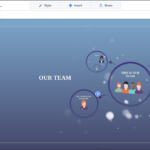
Prezi is a cloud‑based presentation platform designed to support non‑linear, visually engaging presentation formats. Unlike traditional slide decks that progress sequentially from one screen to the next, Prezi allows users to create a large canvas of interconnected content. Presenters can zoom in and out of different areas of the canvas, offering an experience that emphasizes relationships across ideas rather than discrete, isolated slides.
Classified within digital presentation and visual communication tools, Prezi supports text, imagery, video, and graphical elements in a freely navigable space. Its design paradigm reflects a shift toward spatial storytelling, where the arrangement and movement between content elements contribute to meaning. This places Prezi in a distinct category compared to more conventional presentation editing software.
Key Features Explained
The architecture of Prezi centers on a few defining features that differentiate it from linear alternatives:
- Zoomable Canvas: At the core of Prezi’s design philosophy is its zooming interface. Users build their presentations on a large, two‑dimensional surface, placing topics and subtopics spatially. The zoom functionality allows for dynamic scaling between macro and micro views of content, offering a more holistic experience of a subject matter.
- Path Sequencing: Instead of presenting individual slides in order, Prezi enables the definition of a “path” through the canvas. This path dictates the sequence of zooms and pans, establishing a narrative flow without the constraints of slide‑by‑slide ordering.
- Templates and Themes: The tool includes a variety of templates and thematic frameworks to guide initial layout and design. These templates are structured to illustrate common narrative flows or conceptual maps, aiding users who are new to non‑linear presentation formats.
- Collaborative Editing: With its cloud‑based architecture, Prezi supports shared editing among multiple contributors. This allows teams to work concurrently on a presentation, retaining version history and real‑time updates.
- Multimedia Integration: Users can embed videos, graphics, charts, and other media types directly within the canvas. This multimedia support aligns with contemporary expectations for rich, layered content in educational and professional presentations.
- Accessibility Options: The platform includes features to accommodate accessibility needs, such as alternative text descriptions and keyboard navigation aids, reflecting broader industry concerns around inclusive design.
Common Use Cases
Prezi is utilized across multiple settings where visual communication and conceptual clarity are prioritized:
- Educational Settings: Educators leverage Prezi to construct lessons that visualize complex processes, such as historical timelines or scientific systems. The zoomable canvas can help students see how discrete pieces of information fit into larger frameworks.
- Corporate Briefings: Analysts and strategists may use Prezi to present market insights, highlighting connections between data points and strategic implications. The tool’s visual flow can help emphasize relationships that might be less apparent in linear decks.
- Conferences and Public Talks: Speakers often seek ways to break free from static slides during presentations. Prezi’s motion‑oriented transitions can provide a more engaging backdrop for delivering ideas in keynote sessions or panel discussions.
- Project Planning: Teams engaged in planning or design activities sometimes use Prezi to map project components and contingencies. The spatial layout supports visualization of dependencies and task sequences.
- Workshops and Training Modules: Trainers may adopt Prezi for interactive sessions where participants are encouraged to explore concept maps or procedural flows.
Potential Advantages
Evaluating Prezi’s design and functionality reveals several potential advantages that stem from its distinct approach to presentations:
- Holistic Visualization: The ability to position content spatially can help audiences perceive the structure and relationships within a body of information, rather than viewing isolated pieces.
- Dynamic Engagement: Movement between different areas of the canvas through zoom and pan can provide a more varied visual experience, which may aid attention and retention compared to static slides.
- Flexibility in Narrative Structure: Because presentations are not bound to a linear sequence, presenters can adapt on the fly to audience questions or points of interest, navigating fluidly between topics.
- Collaborative Creation: Cloud‑based collaboration supports iterative refinement of presentations by distributed teams, aligning with workflows in modern organizations.
- Multimedia Support: Embedded video and graphics can enrich the presentation, allowing for a multimedia approach that aligns with diverse learning and communication styles.
Limitations & Considerations
No tool is without trade‑offs, and Prezi’s distinctive model presents limitations worth acknowledging:
- Learning Curve for New Users: The non‑linear canvas approach differs significantly from more familiar slide‑based editors. Users new to spatial presentation design may require time to develop proficiency.
- Cognitive Load Risk: The dynamic movements inherent in zooming and panning can, for some audiences, introduce cognitive load if not carefully designed. Excessive motion or overly complex layouts may distract rather than clarify.
- Performance Constraints: Depending on the device and internet connection, rendering the zooming transitions and media elements may be slower compared to traditional slides, particularly for large or media‑rich presentations.
- Accessibility Challenges: While Prezi includes some accessibility features, the visual complexity and motion effects may pose challenges for individuals with certain visual or cognitive impairments. Careful design and supplementary accommodations may be necessary.
- Content Organization Dependence: Effective use of Prezi hinges on thoughtful organization of content within the canvas. Without intentional structuring, presentations can become disorienting to audiences who are unfamiliar with the format.
Who Should Consider This Tool
Prezi may align well with individuals and organizations that have specific presentation needs:
- Visual Thinkers: People who conceptualize information spatially or through interconnected ideas may find the canvas model aligns with their cognitive preferences.
- Educators and Trainers: Professionals focused on explaining systems, relationships, and processes could benefit from the zoom‑based narratives that Prezi supports.
- Design‑Oriented Communicators: Presenters seeking alternatives to static slides for storytelling and thematic development often explore platforms that support more dynamic content navigation.
- Teams Collaborating Remotely: Groups that require shared editing capabilities with cloud storage may appreciate the real‑time collaboration supported in Prezi’s environment.
Who May Want to Avoid It
Despite its strengths, Prezi may not be suitable for all contexts:
- Users Requiring Simple Linear Narratives: For straightforward, sequential information delivery, traditional slide‑based tools may be more efficient and familiar.
- Presenters Prioritizing Minimal Motion: In settings where minimal visual movement is expected or preferred, the dynamic transitions intrinsic to Prezi might not align with audience expectations.
- Highly Technical or Data‑Heavy Reports: Presentations that focus primarily on dense technical data without visual storytelling components may not leverage the full value of a zoomable canvas.
- Accessibility‑Sensitive Environments: Situations requiring strict adherence to accessibility standards may necessitate careful evaluation of whether Prezi’s motion and design features meet required guidelines.
Comparison With Similar Tools
Situating Prezi within the broader ecosystem of presentation tools helps illuminate its distinctive qualities:
- Traditional Slide Editors: Tools that arrange content in sequential slides are ubiquitous in business and education. These linear editors offer straightforward navigation and familiarity, but may lack spatial visualization capabilities.
- Whiteboarding Platforms: Digital whiteboards allow free‑form sketching and brainstorming. While similar in offering a blank space for content, whiteboard tools typically lack defined presentation sequencing and polish.
- Interactive Storytelling Software: Some tools focus on branching narratives or interactive paths that respond to user decisions. Prezi shares a non‑linear ethos but is primarily oriented toward presenter‑driven navigation rather than audience choice.
- Infographic and Visualization Software: Platforms that enable creation of static visual representations excel at encapsulating data relationships. Prezi extends this by embedding narrative movement and temporal pacing.
This comparative view underscores that Prezi occupies a niche that blends visual mapping with guided presentation flow, distinct from both linear deck builders and free‑form creative platforms.
Final Educational Summary
Prezi represents an evolution in presentation design, responding to a shift in how audiences absorb and interact with information. Its zoomable canvas and path‑oriented sequencing challenge the conventions of linear slide decks, offering a spatially oriented alternative for communicating interconnected ideas. The tool’s features support dynamic storytelling, collaborative development, and multimedia integration, which some educators, trainers, and communicators find valuable for articulating complex concepts.
At the same time, Prezi introduces considerations related to learning curve, cognitive load, and performance that necessitate intentional design and audience awareness. Its distinctive methods may benefit visual thinkers and narrative‑driven presenters, while those seeking simplicity or strict linearity may prefer alternative frameworks. By situating Prezi within the wider ecosystem of presentation and visual communication tools, users can make informed decisions about its applicability to their specific contexts.
Understanding Prezi in this analytical light helps clarify not just what the tool offers, but how its design philosophy reflects broader trends in digital communication and visual cognition. This perspective encourages critical engagement with presentation formats, prompting educators and professionals alike to evaluate how structure, movement, and spatial organization influence learning and information retention.
Disclosure: This article is for educational and informational purposes only. Some links on this website may be affiliate links, but this does not influence our editorial content or evaluations.