Introduction
As digital communication channels have expanded, organizations have faced increasing pressure to manage customer interactions efficiently across email, chat, and knowledge bases. Traditional inbox systems, originally designed for individual use, often lack the collaborative structure required for team-based customer support. This gap has contributed to the rise of specialized customer service platforms that centralize communication, streamline workflows, and maintain consistent support quality.
Customer support software now plays a critical role in shaping user experience, operational efficiency, and long-term customer retention. These tools are designed not only to manage incoming queries but also to provide insights into customer behavior, automate repetitive tasks, and improve response coordination among support teams.
Within this broader category, platforms such as Help Scout have emerged as widely recognized solutions aimed at simplifying customer communication while maintaining a human-centric approach.
What Is Help Scout?
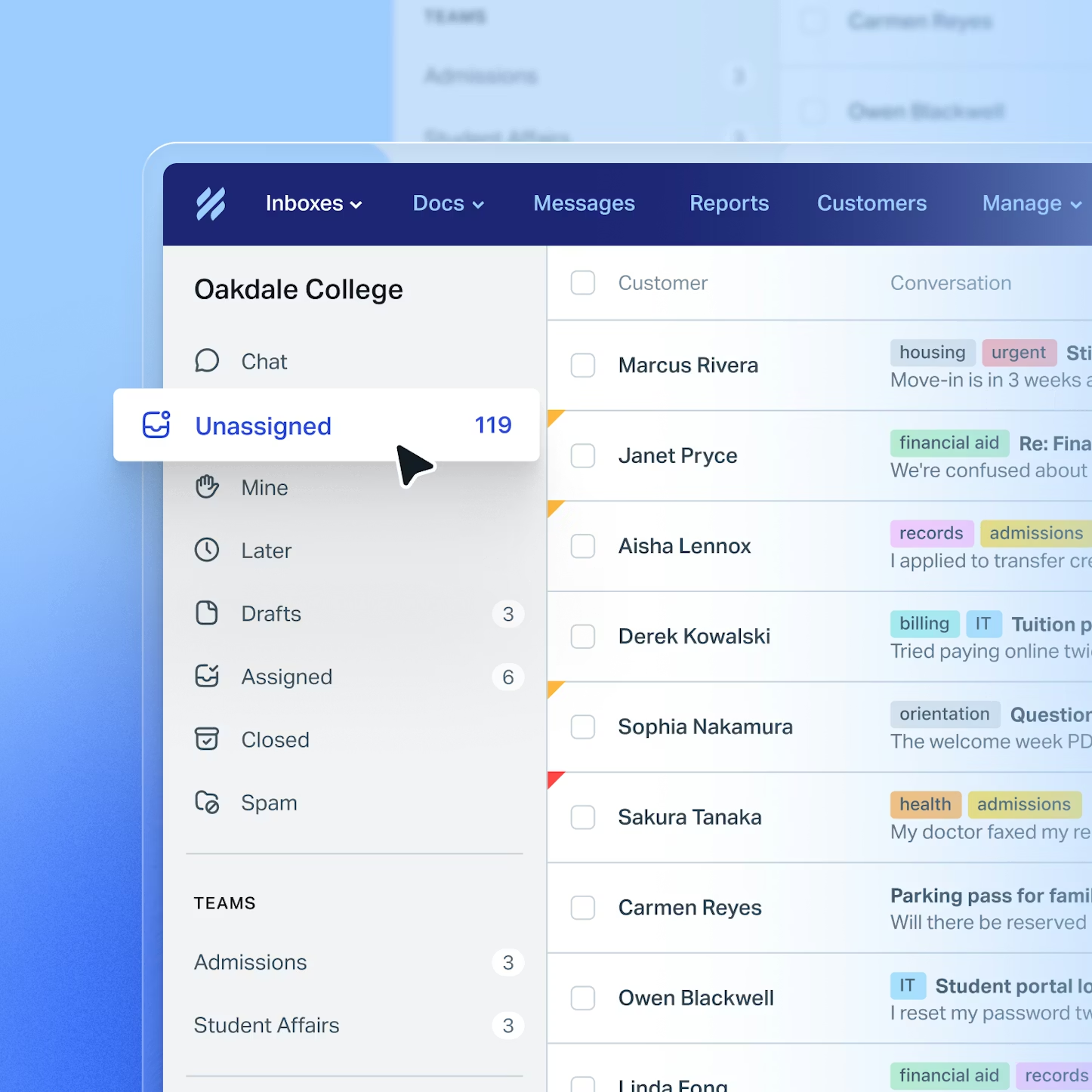
Help Scout is a customer support software platform designed to help businesses manage and respond to customer inquiries across multiple channels. It falls under the category of help desk software, with a focus on email-based support, shared inboxes, live chat functionality, and knowledge base management.
Unlike traditional ticketing systems that emphasize numerical tracking and case IDs, Help Scout adopts a conversation-oriented model. Messages appear similar to standard email threads, which can make interactions feel more personal for both support teams and customers.
The platform is typically used by small to mid-sized organizations, as well as distributed teams that require a centralized yet flexible support system. Its design emphasizes simplicity and usability, aiming to reduce friction in daily support workflows while still offering structured tools for organization and reporting.
Key Features Explained
Shared Inbox System
At the core of Help Scout is its shared inbox feature, which allows multiple team members to manage incoming customer emails collaboratively. Conversations can be assigned, tagged, or marked for follow-up, ensuring that no request is overlooked.
This shared environment replaces the need for forwarding emails or maintaining separate inboxes, reducing duplication of effort and improving response coordination.
Knowledge Base (Docs)
Help Scout includes a built-in knowledge base tool, often referred to as “Docs.” This feature enables organizations to create self-service resources such as FAQs, troubleshooting guides, and product documentation.
By offering accessible support articles, businesses can reduce the volume of repetitive inquiries while providing customers with immediate answers.
Live Chat (Beacon)
The platform integrates live chat functionality through a feature known as Beacon. This allows website visitors to initiate real-time conversations with support agents. Beacon can also display relevant knowledge base articles based on user behavior, blending proactive support with self-service options.
Customer Profiles
Help Scout automatically builds customer profiles that include previous interactions, contact details, and activity history. These profiles provide context for support agents, allowing for more informed and consistent responses.
Automation and Workflows
Automation tools within Help Scout enable teams to create rules for handling incoming messages. For example, emails can be automatically assigned to specific team members based on keywords, customer type, or issue category.
Workflows can also be configured to trigger responses, apply tags, or escalate conversations when necessary.
Reporting and Analytics
The platform includes reporting features that track metrics such as response time, resolution time, and customer satisfaction ratings. These insights can help teams identify bottlenecks, evaluate performance, and refine support strategies.
Integrations
Help Scout supports integration with various third-party tools, including CRM systems, e-commerce platforms, and project management software. These integrations allow for a more connected workflow, reducing the need to switch between multiple applications.
Common Use Cases
Customer Support Teams
Help Scout is frequently used by dedicated support teams handling email and chat inquiries. Its shared inbox structure allows teams to collaborate efficiently while maintaining visibility over all conversations.
SaaS Companies
Software-as-a-service providers often rely on Help Scout to manage user support, onboarding questions, and technical troubleshooting. The knowledge base feature is particularly useful for documenting product usage and reducing repetitive queries.
E-commerce Businesses
Online retailers use Help Scout to address order-related questions, returns, and shipping inquiries. Integration with e-commerce systems can provide agents with order details directly within the platform.
Remote and Distributed Teams
Because Help Scout is cloud-based, it supports remote collaboration. Teams working across different time zones can manage conversations without overlap or confusion.
Content-Driven Organizations
Companies that produce extensive documentation or educational materials may use the Docs feature to organize and present information to users in a structured format.
Potential Advantages
Simplicity in Design
Help Scout is often noted for its clean interface and minimal learning curve. The email-like environment can make onboarding easier for new team members compared to more complex ticketing systems.
Focus on Human-Centered Communication
By avoiding traditional ticket numbers in customer-facing communication, Help Scout promotes a more conversational tone. This can contribute to a more personalized support experience.
Efficient Collaboration
The shared inbox model reduces internal communication gaps. Features such as internal notes and collision detection (which prevents multiple agents from responding simultaneously) help streamline teamwork.
Scalable Knowledge Management
The built-in knowledge base allows organizations to expand their self-service resources over time. This scalability can reduce dependency on direct support interactions.
Flexible Automation
Automation rules can handle routine tasks, freeing up time for support agents to focus on more complex issues. This can improve overall productivity without requiring extensive technical setup.
Limitations & Considerations
Limited Advanced Ticketing Features
Compared to some enterprise-level help desk systems, Help Scout may offer fewer advanced ticket management capabilities. Organizations requiring highly customized workflows or complex escalation processes may find limitations.
Pricing Structure
While not inherently excessive, the pricing model may become a consideration for very small teams or startups with limited budgets. Costs can increase as the number of users grows.
Reporting Depth
Although Help Scout provides standard reporting features, some users may find the analytics less detailed compared to specialized business intelligence tools.
Dependency on Email-Centric Workflow
Help Scout’s design is heavily centered around email-based communication. Organizations that rely more on social media, phone support, or other channels may need additional tools.
Customization Constraints
The platform offers customization options, but these may not be as extensive as those found in more complex systems. Businesses with highly specific requirements might encounter constraints.
Who Should Consider Help Scout
Help Scout may be suitable for:
- Small to medium-sized businesses seeking a structured support system
- Teams transitioning from traditional email inboxes to collaborative platforms
- Organizations prioritizing customer experience and conversational support
- SaaS and digital product companies with ongoing user inquiries
- Remote teams needing centralized communication tools
Its balance between simplicity and functionality makes it particularly relevant for teams that value usability without extensive technical overhead.
Who May Want to Avoid It
Help Scout might not be ideal for:
- Large enterprises requiring highly customizable workflows
- Organizations needing deep analytics and advanced reporting dashboards
- Support teams heavily reliant on non-email channels such as phone or social media
- Businesses requiring extensive automation beyond standard rule-based systems
In such cases, alternative platforms with broader feature sets may be more appropriate.
Comparison With Similar Tools
Help Scout operates within a competitive landscape that includes several well-known customer support platforms.
Help Scout vs Zendesk
Zendesk offers a more comprehensive suite of tools, including advanced ticketing, automation, and analytics. However, it can be more complex to implement and manage. Help Scout, by contrast, focuses on simplicity and ease of use.
Help Scout vs Freshdesk
Freshdesk provides a wide range of features, including multi-channel support and gamification elements. Help Scout maintains a more streamlined approach, which may appeal to teams seeking fewer distractions.
Help Scout vs Intercom
Intercom emphasizes real-time communication and customer engagement through chat and messaging. Help Scout, while offering chat features, remains more rooted in email-based support and knowledge management.
Help Scout vs Groove
Groove is another simplified help desk solution, often compared with Help Scout in terms of usability. The choice between them may depend on specific feature preferences and integration needs.
Final Educational Summary
Help Scout represents a category of customer support platforms designed to bridge the gap between personal email communication and structured team collaboration. Its emphasis on simplicity, shared inbox management, and knowledge base integration reflects a broader trend toward user-friendly support tools.
While it may not offer the extensive customization or advanced analytics found in some enterprise systems, its design philosophy prioritizes clarity, efficiency, and a human-centered approach to customer interaction.
Organizations evaluating customer support solutions should consider their operational scale, communication channels, and reporting requirements when assessing whether Help Scout aligns with their needs. As with any software tool, its effectiveness depends largely on how well it integrates into existing workflows and supports long-term customer engagement strategies.