Introduction
Digital marketing has evolved into a data-driven discipline where capturing user interest and converting it into measurable outcomes remains a central challenge. Businesses, educators, and independent creators often face difficulty in building web pages that are optimized for specific actions such as email sign-ups, product inquiries, or event registrations. Traditional website builders are frequently designed for general-purpose use, which may not adequately address the need for focused, conversion-oriented pages.
This gap has led to the emergence of specialized landing page platforms. These tools are designed to simplify the creation of standalone web pages that guide visitors toward a single objective. Within this category, platforms like Leadpages have gained attention for offering structured solutions aimed at users without extensive technical backgrounds. Understanding how such tools function helps contextualize their role in the broader digital ecosystem.
What Is Leadpages?
Leadpages is a web-based application categorized under landing page builders and conversion optimization tools. Developed by Leadpages, it provides users with a framework to create, publish, and manage standalone pages designed for specific marketing or informational purposes.
Unlike full-scale content management systems, Leadpages focuses on modular page creation with pre-designed templates and drag-and-drop editing capabilities. It typically integrates with other digital tools such as email marketing systems, analytics platforms, and customer relationship management software.
The platform operates as a Software-as-a-Service (SaaS) product, meaning users access it through a browser without needing to install software locally. Its primary function is to streamline the process of building pages that emphasize user interaction and data collection.
Key Features Explained
Template-Based Page Design
One of the defining elements of Leadpages is its use of pre-built templates. These templates are structured layouts tailored for different objectives such as webinar registrations, lead capture forms, or product showcases. The templates are often categorized based on use cases, allowing users to select a starting point aligned with their goals.
Drag-and-Drop Editor
The visual editor allows users to modify page elements without coding knowledge. Text blocks, images, forms, and buttons can be repositioned within the layout. This interface reduces the reliance on front-end development skills while maintaining flexibility in design adjustments.
Lead Capture Forms
Leadpages includes built-in form functionality designed to collect user data such as names and email addresses. These forms can be embedded directly within landing pages or deployed as pop-ups. Data collected can typically be routed to external systems through integrations.
Integration Capabilities
The platform supports connections with third-party tools including email marketing services, payment gateways, and analytics software. This interoperability enables users to incorporate Leadpages into existing workflows rather than treating it as a standalone system.
Mobile Responsiveness
Pages created with Leadpages are generally optimized for different screen sizes. Given the increasing volume of mobile traffic, responsive design ensures usability across smartphones, tablets, and desktops.
Analytics and Tracking
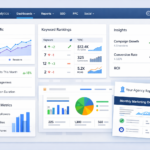
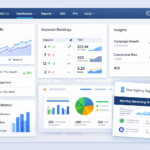
Basic performance metrics such as page views and conversion rates are available within the platform. These insights allow users to evaluate how effectively a page meets its intended objective.
A/B Testing
Some versions of Leadpages offer split testing functionality. This feature enables users to create multiple variations of a page and compare their performance, helping identify which design or messaging approach yields better results.
Common Use Cases
Lead Generation Campaigns
Organizations frequently use Leadpages to create pages dedicated to collecting contact information. These pages may offer downloadable resources, newsletters, or access to exclusive content in exchange for user details.
Event Registration Pages
For webinars, workshops, or online courses, Leadpages can be used to build registration pages that centralize event information and participant sign-ups.
Product Launch Announcements
Businesses may deploy landing pages to introduce new products or services. These pages focus on presenting key information while encouraging visitors to take a specific action.
Email List Building
Content creators and bloggers often use Leadpages to grow their subscriber base. Dedicated pages are designed to capture email addresses through minimalistic layouts.
Sales Pages
Although not a full e-commerce platform, Leadpages can support simple transactional pages when integrated with payment processors. These pages are typically used for single-product offerings.
Potential Advantages
Reduced Technical Barrier
Leadpages simplifies the process of page creation by removing the need for coding expertise. This accessibility makes it suitable for individuals or small teams without dedicated developers.
Time Efficiency
Pre-designed templates and reusable components can significantly reduce the time required to launch a landing page. Users can move from concept to publication relatively quickly.
Focused Design Philosophy
The platform emphasizes single-purpose pages, which aligns with established principles of conversion optimization. This focus can help reduce distractions for users visiting the page.
Integration Flexibility
Compatibility with a wide range of external tools allows users to maintain continuity across their digital infrastructure. This is particularly useful for organizations already using specialized marketing software.
Scalability for Campaigns
Leadpages can support multiple pages simultaneously, making it suitable for running parallel campaigns or testing different approaches.
Limitations & Considerations
Customization Constraints
While the drag-and-drop editor provides flexibility, it may not offer the same level of control as custom-coded pages. Advanced design requirements might be difficult to implement within the platform’s framework.
Dependence on Templates
Relying heavily on templates can lead to visual similarities across different users’ pages. This may limit the uniqueness of branding in some cases.
Subscription-Based Pricing Model
As a SaaS platform, Leadpages typically operates on a recurring payment structure. This may not align with users seeking one-time purchase solutions.
Learning Curve for Advanced Features
Although basic functionality is accessible, features like A/B testing and integrations may require additional time to understand and implement effectively.
Limited Full-Site Capabilities
Leadpages is not designed to replace comprehensive website builders. Users needing multi-page websites with complex navigation structures may need supplementary tools.
Who Should Consider This Leadpage
Small Business Owners
Individuals managing small enterprises often need efficient ways to create targeted pages without hiring developers. Leadpages can provide a structured approach to achieving this.
Digital Marketers
Professionals focused on campaign performance may benefit from the platform’s emphasis on conversion-oriented design and analytics.
Content Creators and Educators
Bloggers, course creators, and independent educators can use Leadpages to manage audience engagement through subscription forms and event pages.
Freelancers
Freelancers offering marketing or design services may find Leadpages useful for quickly delivering landing page solutions to clients.
Who May Want to Avoid It
Advanced Developers
Users with expertise in web development might find Leadpages limiting compared to custom-built solutions that allow complete control over code and functionality.
Large Enterprises with Complex Needs
Organizations requiring highly customized workflows, extensive integrations, or proprietary systems may need more robust platforms.
Budget-Conscious Users
Those seeking free or one-time payment tools may find the subscription model less suitable for their needs.
Users Requiring Full Website Management
Leadpages is not intended to function as a full content management system. Users needing extensive site architecture may prefer alternatives designed for that purpose.
Comparison With Similar Tools
Landing page builders form a competitive segment within digital marketing software. Comparing Leadpages with similar platforms helps clarify its positioning.
Leadpages vs Unbounce
Unbounce offers more advanced customization options and AI-driven optimization features. However, it may present a steeper learning curve compared to Leadpages’ more structured approach.
Leadpages vs Instapage
Instapage focuses heavily on enterprise-level collaboration and personalization. Leadpages, in contrast, is often positioned toward smaller teams and individual users.
Leadpages vs ClickFunnels
ClickFunnels extends beyond landing pages to include full sales funnel management. Leadpages remains more narrowly focused on page creation rather than end-to-end funnel systems.
Leadpages vs Wix
Wix is a general-purpose website builder with broader design capabilities. Leadpages differs by concentrating specifically on conversion-focused pages rather than full websites.
Final Educational Summary
Landing page platforms address a specific challenge within digital communication: guiding users toward a defined action without unnecessary distractions. Leadpages represents one approach to solving this problem through template-driven design, simplified editing tools, and integration capabilities.
Its strengths lie in accessibility, efficiency, and a focused design philosophy. At the same time, limitations related to customization and scope highlight the importance of aligning tool selection with user requirements. For individuals and small teams seeking structured solutions for targeted page creation, Leadpages provides a functional framework. However, users with more complex needs may need to evaluate alternative platforms or complementary tools.
Understanding such platforms in context allows for more informed decisions when selecting digital tools, particularly in environments where efficiency and clarity of purpose are essential.
Disclosure: This article is for educational and informational purposes only. Some links on this website may be affiliate links, but this does not influence our editorial content or evaluations.