
Introduction
Customer relationship management (CRM) tools are used to organize contacts, track communication, and manage sales or workflow pipelines. These systems are often used by individuals and teams who need structured visibility into ongoing conversations and follow-ups.
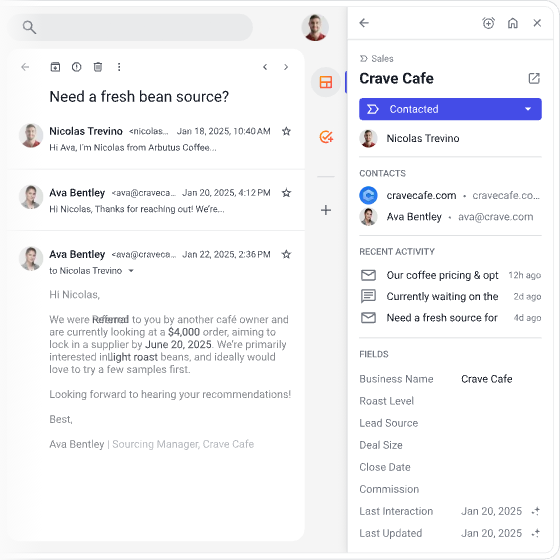
Some CRM tools are designed to operate inside existing platforms instead of requiring a separate dashboard. One example is Streak CRM, which works directly within Gmail. It is built to manage CRM-related tasks without leaving the email interface.
What Is Streak CRM?
Streak CRM is a browser-based CRM tool that integrates directly into Gmail. Instead of using a separate application, it adds CRM functionality inside the email inbox.
It is commonly used by individuals, freelancers, and small teams who rely heavily on email communication for managing leads, clients, or projects.
Open in Gmail View
Key Features Explained
1. Gmail Integration
Streak CRM operates inside Gmail, allowing users to manage CRM data without switching platforms.
2. Pipeline Management
Users can create visual pipelines to track deals, projects, or tasks through different stages.
3. Email Tracking
Emails can be monitored to see whether they were opened or read, depending on settings.
4. Contact Organization
Contacts and communication threads are stored and grouped within Gmail.
5. Basic Automation Tools
Some repetitive tasks can be automated, such as follow-up reminders or status updates.
Common Use Cases
Streak CRM is typically used in scenarios such as:
- Managing sales leads directly from email
- Tracking client communication in Gmail threads
- Handling freelance project pipelines
- Organizing recruitment or outreach processes
- Managing small team workflows inside email
Potential Advantages
The following are functional advantages based on its design:
- No need to switch between email and external CRM tools
- Easy adoption for users already using Gmail
- Simple pipeline visualization inside inbox
- Lightweight structure suitable for small workflows
- Centralized communication tracking within email threads
Limitations & Considerations
Streak CRM also has limitations that should be considered:
- Limited functionality outside Gmail ecosystem
- Not suitable for complex enterprise CRM workflows
- Advanced reporting and analytics may be limited
- Dependence on Gmail may restrict flexibility
- Large-scale automation capabilities are less extensive compared to dedicated CRM platforms
Who Should Consider This Tool
This type of CRM may be suitable for:
- Freelancers managing client communication through email
- Small teams working primarily inside Gmail
- Individuals who prefer minimal external software
- Users managing simple sales or outreach pipelines
Who May Want to Avoid It
It may not be suitable for:
- Large organizations requiring advanced CRM systems
- Teams needing multi-channel communication tracking beyond email
- Businesses requiring deep automation and reporting features
- Users not primarily dependent on Gmail for work
Comparison With Similar Tools
CRM tools differ in their approach:
- Some platforms focus on full standalone CRM dashboards
- Others prioritize automation and marketing workflows
- Certain tools are designed for enterprise-level scalability
Streak CRM differs by focusing on email-native CRM functionality inside Gmail, rather than operating as a separate system.
Final Educational Summary
Streak CRM is a Gmail-integrated CRM tool designed to manage pipelines, contacts, and communication directly within an email inbox. It is mainly used for lightweight CRM workflows where email is the central communication channel.
Its suitability depends on how heavily a user relies on Gmail and how complex their workflow requirements are. Users typically compare it with other CRM systems before deciding on adoption.
Readers should evaluate tools based on their own requirements and workflow expectations.
Read System Overview
