
Introduction
Managing employee compensation, compliance, and administrative processes has become increasingly complex for organizations of all sizes. As labor regulations evolve and workforce structures diversify—especially with remote work, freelance arrangements, and multi-state employment—businesses face mounting challenges in maintaining accuracy and efficiency. Traditional payroll systems, often reliant on manual input or fragmented software, struggle to keep pace with these demands.
This complexity has contributed to the growth of integrated payroll and human resources (HR) platforms. These systems aim to centralize payroll processing, employee data management, tax filing, and benefits administration into a single environment. By doing so, they reduce administrative burden while improving compliance oversight.
Within this category, Gusto has emerged as a widely recognized platform designed primarily for small to medium-sized businesses. Its approach combines payroll automation with HR tools, offering a unified framework for workforce management.
What Is Gusto?
Gusto is a cloud-based payroll, benefits, and human resources software platform. It is designed to help businesses manage employee compensation, tax compliance, onboarding, and related administrative tasks within a centralized system.
Functionally, Gusto falls under the broader category of payroll and HR management software, often referred to as “HR tech” or “workforce management systems.” Unlike standalone payroll tools, it integrates multiple administrative functions, allowing employers to coordinate payroll processing with employee records and benefits management.
The platform is typically used by small and mid-sized organizations, startups, and companies transitioning away from manual payroll systems. It operates entirely online, enabling access through web-based dashboards rather than locally installed software.
Key Features Explained
Automated Payroll Processing
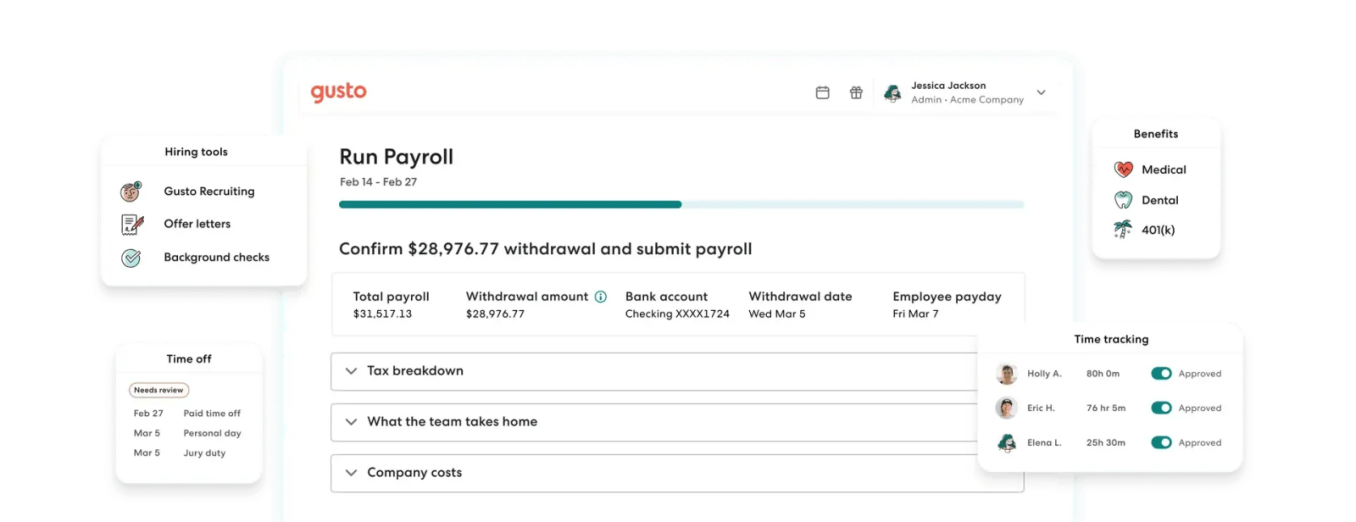
One of the central components of Gusto is its payroll automation system. Businesses can configure recurring payroll schedules, allowing wages, salaries, and contractor payments to be processed with minimal manual intervention. The system calculates deductions such as taxes and benefits contributions based on employee data and applicable regulations.
Automation reduces the likelihood of calculation errors and ensures consistency across pay cycles. It also supports multiple pay types, including hourly wages, salaries, bonuses, and commissions.
Tax Filing and Compliance Support
Gusto includes built-in tax calculation and filing capabilities. The platform determines federal, state, and local payroll taxes based on employee location and employment classification. It can generate tax forms and submit filings electronically.
Compliance features are particularly relevant for businesses operating across multiple jurisdictions. By maintaining updated tax rules within the system, Gusto helps reduce the risk of non-compliance due to outdated information.
Employee Onboarding Tools
The onboarding module allows new hires to submit personal information, tax forms, and banking details digitally. This reduces reliance on paper-based processes and streamlines data collection.
Employees can complete onboarding tasks through a secure portal, which integrates directly with payroll and HR records. This ensures that data entered during onboarding flows seamlessly into other parts of the system.
Benefits Administration
Gusto supports benefits management, including health insurance, retirement plans, and other employee perks. Employers can configure benefit offerings and manage enrollments within the platform.
The integration between payroll and benefits ensures that deductions are applied accurately and consistently. It also allows employees to view and manage their benefits selections through their accounts.
Time Tracking and Attendance Integration
Some versions of Gusto include time tracking features or integrations with third-party timekeeping tools. These features enable businesses to track employee hours and automatically incorporate them into payroll calculations.
Accurate time tracking is particularly important for hourly workers and businesses with variable schedules.
Reporting and Analytics
Gusto provides reporting tools that allow employers to generate insights into payroll expenses, tax liabilities, and workforce trends. Reports can be customized to focus on specific time periods or employee groups.
These analytics can support budgeting decisions and help organizations better understand labor costs.
Common Use Cases
Small Business Payroll Management
Many small businesses use Gusto as their primary payroll solution. It simplifies wage calculations, tax filings, and employee payments, reducing the need for dedicated payroll staff.
Startup Workforce Administration
Startups often adopt integrated platforms early to avoid building fragmented administrative systems. Gusto provides a centralized solution for managing employees as companies grow.
Contractor Payment Processing
Organizations that work with freelancers or independent contractors can use Gusto to issue payments and generate necessary tax documentation.
Multi-State Employment Management
Businesses operating across different states benefit from Gusto’s ability to handle varying tax rules and compliance requirements.
HR Record Centralization
Gusto also functions as a repository for employee data, including personal details, compensation history, and benefits information. This centralization improves data accessibility and consistency.
Potential Advantages
Streamlined Administrative Workflows
By combining payroll, HR, and benefits into a single system, Gusto reduces the need for multiple tools. This integration minimizes data duplication and simplifies administrative processes.
Reduced Risk of Calculation Errors
Automated calculations for wages, taxes, and deductions help reduce human error. This is particularly useful for businesses transitioning from manual payroll systems.
Accessibility Through Cloud Infrastructure
As a cloud-based platform, Gusto allows users to access payroll and HR data from different locations. This is beneficial for remote teams and distributed workforces.
Improved Employee Experience
Employees can access their pay stubs, tax forms, and benefits information through a self-service portal. This reduces the need for administrative inquiries and enhances transparency.
Scalability for Growing Businesses
Gusto is designed to accommodate business growth, supporting additional employees and more complex payroll scenarios over time.
Limitations & Considerations
Cost Structure for Smaller Teams
While Gusto is often used by small businesses, pricing models based on per-employee fees may become a consideration for very small teams or startups with limited budgets.
Limited Customization for Complex Enterprises
Larger organizations with highly specialized payroll requirements or complex HR structures may find the platform less flexible compared to enterprise-level systems.
Dependency on Internet Access
As a cloud-based service, Gusto requires reliable internet connectivity. Businesses operating in environments with inconsistent access may encounter challenges.
Learning Curve for New Users
Although designed to be user-friendly, some users may require time to become familiar with the system’s interface and features, particularly if transitioning from manual processes.
Regional Availability Constraints
Certain features, such as benefits offerings, may be limited to specific geographic regions. This can affect businesses operating internationally.
Who Should Consider This Tool
Gusto is generally suited for organizations seeking to centralize payroll and HR functions without investing in large-scale enterprise systems.
Small to Medium-Sized Businesses
Companies with limited administrative resources often benefit from the automation and integration offered by Gusto.
Startups and Growing Teams
Businesses in early growth stages can use the platform to establish structured payroll and HR processes from the outset.
Remote and Distributed Workforces
Organizations with employees in multiple locations can leverage the platform’s cloud accessibility and compliance features.
Employers Seeking Simplified Compliance
Businesses that need assistance managing tax filings and regulatory requirements may find value in the platform’s built-in compliance tools.
Who May Want to Avoid It
Large Enterprises With Complex Needs
Organizations requiring extensive customization, advanced analytics, or integration with complex enterprise systems may find Gusto less suitable.
Businesses With Minimal Payroll Activity
Companies with very few employees or infrequent payroll cycles might not fully utilize the platform’s capabilities.
Organizations Requiring Offline Functionality
Businesses that operate in low-connectivity environments may prefer solutions that offer offline capabilities.
International Companies With Broad Global Operations
While Gusto supports U.S.-based payroll effectively, companies with significant international operations may need more globally focused platforms.
Comparison With Similar Tools
Gusto vs. Traditional Payroll Software
Traditional payroll systems often rely on manual data entry and separate tools for tax filing and HR management. In contrast, Gusto integrates these functions, reducing administrative fragmentation.
Gusto vs. Enterprise HR Platforms
Enterprise solutions typically offer broader customization and advanced analytics but may require significant implementation resources. Gusto provides a more streamlined alternative with fewer configuration requirements.
Gusto vs. Other Cloud-Based Payroll Tools
Compared to similar cloud payroll platforms, Gusto emphasizes user experience and integration with HR features. However, some competitors may offer more extensive international support or specialized industry features.
Final Educational Summary
Gusto represents a modern approach to payroll and human resource management, reflecting broader shifts toward automation and cloud-based infrastructure. By consolidating payroll processing, tax compliance, and HR administration into a unified system, it addresses many of the inefficiencies associated with traditional methods.
Its design aligns with the needs of small to medium-sized organizations, particularly those seeking to reduce administrative overhead while maintaining compliance. At the same time, its limitations highlight the importance of aligning software selection with organizational scale, complexity, and geographic scope.
Understanding tools like Gusto requires examining not only their features but also the operational contexts in which they are used. As workforce management continues to evolve, platforms in this category will likely play an increasingly central role in business operations.
