
Introduction
Across industries, the increasing complexity of digital workflows has created a growing demand for tools that can simplify automation without requiring advanced programming expertise. Businesses, educators, and independent creators frequently manage repetitive processes—content generation, data handling, research aggregation, and task coordination—that consume time and introduce inefficiencies.
The emergence of no-code and low-code platforms has attempted to address these challenges by enabling users to design workflows visually. More recently, artificial intelligence has been integrated into these systems, expanding their capabilities beyond rule-based automation into adaptive, context-aware operations. This shift has given rise to a new category of tools often described as AI workflow builders.
Within this category, MindStudio represents one example of a platform designed to allow users to create AI-driven processes without extensive technical knowledge. Understanding how such tools function, where they are useful, and what limitations they present is essential for evaluating their relevance in real-world applications.
What Is MindStudio?
MindStudio is an AI-powered workflow automation platform that enables users to build, customize, and deploy processes that incorporate artificial intelligence models. It falls within the broader category of no-code AI development tools, with a focus on enabling structured workflows that combine prompts, logic steps, and integrations.
Rather than functioning as a standalone AI model, MindStudio acts as an orchestration layer. Users can design sequences where inputs—such as text, documents, or data fields—are processed through various stages. These stages may include natural language generation, classification, summarization, or decision-making steps powered by AI systems.
The platform is commonly associated with use cases such as content production pipelines, automated research assistants, and business process automation. Its design typically emphasizes modular construction, where each step in a workflow can be adjusted independently.
Key Features Explained
Visual Workflow Builder
One of the central components of MindStudio is its visual interface for constructing workflows. Users can arrange steps in a sequence or branching structure, defining how data moves through the system.
Instead of writing code, individuals configure actions such as:
- Input collection
- AI prompt execution
- Conditional logic
- Output formatting
This visual approach aligns with trends in no-code development, making it accessible to users without programming backgrounds while still offering structural control.
AI Prompt Integration
MindStudio allows users to embed prompts directly into workflow steps. These prompts can be customized for different tasks, including:
- Content generation
- Text summarization
- Language translation
- Data extraction
The ability to refine prompts within a structured environment distinguishes it from standalone AI chat interfaces. Workflows can reuse and adapt prompts dynamically based on earlier outputs.
Multi-Step Automation
Unlike simple AI tools that perform a single task, MindStudio supports multi-step processes. For example, a workflow might:
- Accept a topic input
- Generate an outline
- Expand sections into full text
- Edit or refine tone
- Format the final output
This layered approach enables more complex automation scenarios that resemble human workflows.
Conditional Logic and Branching
The platform includes logic-based decision points, allowing workflows to change direction based on inputs or intermediate results. For instance:
- If a text meets certain criteria, proceed to one step
- Otherwise, route it to an alternative path
Such branching introduces adaptability, which is important for handling varied inputs.
Integration Capabilities
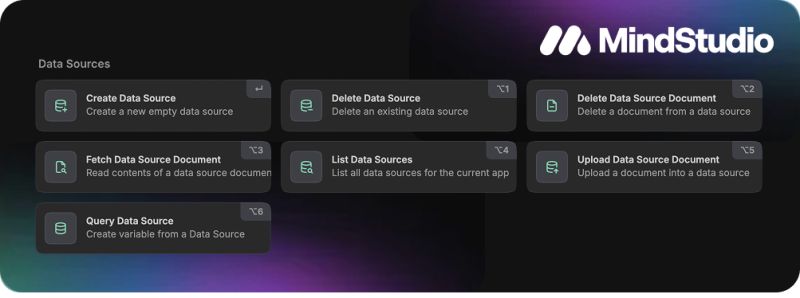
MindStudio may support integration with external tools and data sources, enabling workflows to interact with APIs, databases, or third-party applications. This expands its usefulness beyond isolated tasks.
Reusable Templates
Users can create and reuse workflow templates, reducing the need to build processes from scratch each time. Templates also support standardization across teams or projects.
Common Use Cases
Content Production Pipelines
One of the more visible applications of MindStudio is in structured content creation. Instead of generating text in a single step, users can design workflows that:
- Develop outlines
- Expand sections
- Apply stylistic edits
- Conduct basic quality checks
This approach is particularly relevant for editorial teams managing recurring content formats.
Research Assistance
Workflows can be designed to process research inputs, summarize findings, and organize key points. This is useful in academic, journalistic, or analytical contexts where large volumes of information must be condensed.
Customer Support Automation
Some users employ AI workflow tools to manage support queries. A workflow might:
- Interpret incoming messages
- Categorize issues
- Generate draft responses
While not fully replacing human agents, such systems can assist in triaging requests.
Data Processing and Classification
MindStudio can be used to classify text, extract information, or transform data formats. This is relevant in areas like:
- Survey analysis
- Document review
- Metadata tagging
Educational Content Structuring
Educators and instructional designers may use workflows to create lesson outlines, quizzes, or explanatory materials based on specific inputs.
Potential Advantages
Accessibility Without Programming
One of the primary strengths of platforms like MindStudio is their accessibility. Users without coding experience can design workflows that would otherwise require software development skills.
Structured AI Usage
By embedding AI into defined workflows, MindStudio introduces structure to tasks that might otherwise be handled in an ad hoc manner. This can improve consistency in outputs.
Time Efficiency in Repetitive Tasks
For recurring processes, automation can reduce the need for manual repetition. Once a workflow is configured, it can be reused with different inputs.
Customization Flexibility
Workflows can be tailored to specific needs, allowing users to adjust prompts, logic, and outputs according to their requirements.
Scalability of Processes
In some contexts, workflows can handle increasing volumes of tasks without a proportional increase in manual effort, particularly for text-based operations.
Limitations & Considerations
Dependence on AI Output Quality
The effectiveness of MindStudio workflows is closely tied to the quality of underlying AI outputs. Variability in responses can affect consistency, especially in complex tasks.
Learning Curve for Workflow Design
While no coding is required, designing effective workflows still involves understanding logic structures, prompt engineering, and process design. This can present a learning curve for new users.
Potential for Over-Automation
Not all processes benefit from automation. In tasks requiring nuanced judgment or creativity, excessive reliance on AI workflows may reduce quality or introduce errors.
Integration Constraints
The usefulness of integrations depends on compatibility with external systems. Limited or complex integration options may restrict certain applications.
Data Privacy Considerations
As with many AI tools, handling sensitive data within workflows requires attention to privacy and compliance requirements. Users must evaluate how data is processed and stored.
Who Should Consider MindStudio
Content Teams Managing Repetitive Formats
Editorial teams that produce structured content—such as articles, summaries, or reports—may find value in workflow-based automation.
Educators and Instructional Designers
Those developing educational materials can use workflows to standardize content creation processes and reduce manual effort.
Small Businesses Exploring Automation
Organizations with limited technical resources may use tools like MindStudio to automate routine tasks without hiring developers.
Researchers Handling Large Text Volumes
Individuals working with extensive textual data may benefit from automated summarization and organization workflows.
Who May Want to Avoid It
Users Seeking Simple AI Interactions
Individuals who only require occasional AI-generated responses may find a full workflow platform unnecessary.
Highly Technical Development Teams
Developers who prefer full control through custom code may find no-code platforms restrictive compared to traditional programming environments.
Tasks Requiring High Precision and Verification
Workflows that depend on exact accuracy—such as legal analysis or critical decision-making—may require more robust validation than AI workflows can reliably provide.
Organizations With Strict Data Regulations
In environments where data handling is tightly regulated, the use of AI workflow tools may require careful evaluation before adoption.
Comparison With Similar Tools
MindStudio vs Traditional No-Code Automation Platforms
Traditional automation tools focus on rule-based processes, such as triggering actions when conditions are met. MindStudio extends this by incorporating AI-driven steps, allowing for more flexible and context-aware operations.
MindStudio vs Standalone AI Writing Tools
Standalone AI tools typically generate outputs based on a single prompt. MindStudio differs by enabling multi-step workflows, which can produce more structured and refined results.
MindStudio vs Developer-Focused AI Frameworks
Developer-oriented frameworks offer deeper customization and integration capabilities but require programming expertise. MindStudio trades some of this flexibility for accessibility and ease of use.
MindStudio vs Other AI Workflow Builders
Within the growing category of AI workflow platforms, differences often lie in interface design, integration support, and customization depth. MindStudio represents one approach that emphasizes modular workflow construction and prompt-based automation.
Final Educational Summary
MindStudio illustrates a broader shift in how artificial intelligence is being applied within digital workflows. Rather than functioning solely as a tool for isolated tasks, AI is increasingly embedded within structured processes that mirror real-world operations.
The platform’s emphasis on visual workflow design, multi-step automation, and prompt integration reflects the evolving needs of users who seek both flexibility and accessibility. At the same time, its limitations highlight the importance of understanding when automation is appropriate and how AI outputs should be evaluated.
As AI workflow builders continue to develop, their role is likely to expand across industries. However, their effectiveness will depend not only on technological capabilities but also on how thoughtfully they are applied within specific contexts.
Disclosure: This article is for educational and informational purposes only. Some links on this website may be affiliate links, but this does not influence our editorial content or evaluations.
