
Introduction
Managing construction projects has long involved coordinating multiple moving parts—labor, materials, timelines, budgets, and compliance requirements. Traditional methods such as spreadsheets, manual logs, and fragmented communication channels often create inefficiencies, particularly as project complexity increases. These challenges have contributed to the emergence of construction management software, a category designed to centralize operations and improve oversight.
Digital tools in this space aim to streamline workflows, enhance collaboration, and provide real-time visibility into project performance. Among these platforms, Contractor Foreman is one example frequently discussed in relation to small to mid-sized construction businesses seeking structured project coordination tools.
View Contractor Foreman Features
What Is Contractor Foreman?
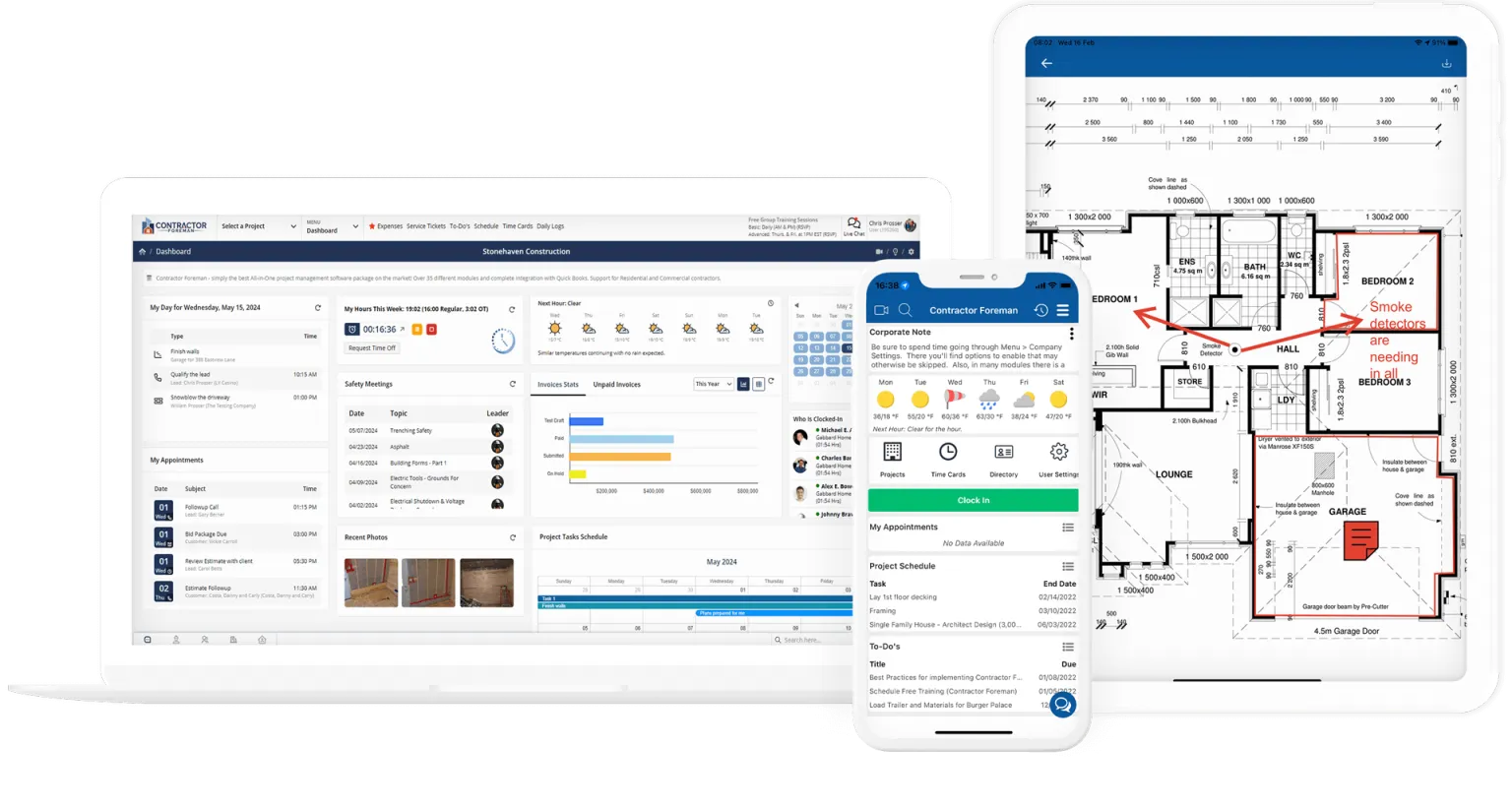
Contractor Foreman is a cloud-based construction management software platform designed to support contractors in handling various aspects of project administration. It belongs to the broader category of project management tools tailored specifically for the construction industry.
The platform integrates features related to scheduling, budgeting, document management, and team communication into a single interface. Its design reflects the operational needs of contractors, subcontractors, and project managers who require centralized access to project data while working across job sites and offices.
Rather than focusing on a single function, Contractor Foreman operates as a multi-functional system that attempts to consolidate common construction workflows into one environment.
Key Features Explained
Project Scheduling and Timeline Management
One of the central components of Contractor Foreman is its scheduling functionality. Users can create timelines, assign tasks, and track progress across different phases of a project. This feature typically includes calendar views and task dependencies, allowing teams to understand how delays in one area may impact overall completion.
Estimating and Budget Tracking
The platform includes tools for creating cost estimates and monitoring budgets. Estimating features help define projected expenses for labor, materials, and other resources. Budget tracking then compares actual spending against these projections, helping identify discrepancies.
Document and File Management
Construction projects generate a large volume of documents, including blueprints, contracts, permits, and reports. Contractor Foreman provides a centralized repository where these files can be stored, organized, and accessed by authorized users.
Time Tracking and Workforce Management
Labor management tools within Contractor Foreman allow users to log employee hours, monitor attendance, and track productivity. This feature supports payroll processes and provides insights into workforce allocation.
Communication and Collaboration Tools
Effective communication is essential in construction environments where teams are often distributed across multiple locations. The platform includes messaging systems, notifications, and shared updates to keep stakeholders informed.
Change Order Management
Construction projects frequently involve changes in scope. Contractor Foreman includes features for documenting, approving, and tracking change orders, helping maintain clarity and accountability.
Reporting and Analytics
The software generates reports related to project progress, financial performance, and operational metrics. These reports can assist in evaluating efficiency and identifying trends over time.
Common Use Cases
Small Construction Firms Managing Multiple Projects
Contractor Foreman is often used by small businesses that handle several projects simultaneously. The platform helps organize workflows and maintain visibility across different job sites.
Independent Contractors and Subcontractors
Independent professionals may use the tool to track project details, manage client communications, and handle documentation without relying on multiple separate systems.
Residential and Commercial Project Management
Both residential builders and commercial contractors may apply Contractor Foreman to coordinate timelines, budgets, and teams involved in construction projects.
Administrative Coordination
Office-based staff can use the platform to manage invoices, maintain records, and monitor project updates without needing direct site involvement.
Potential Advantages
Centralized Information Access
One of the notable aspects of Contractor Foreman is the consolidation of multiple functions into a single platform. This reduces the need to switch between different tools for scheduling, budgeting, and communication.
Improved Workflow Organization
By structuring tasks and timelines within a digital system, users can achieve more consistent workflow management. This may reduce reliance on manual tracking methods.
Enhanced Visibility
Real-time updates allow project stakeholders to monitor progress and identify issues earlier. This visibility can support more informed decision-making.
Scalability for Growing Teams
As construction businesses expand, managing additional projects and team members becomes more complex. Contractor Foreman provides features that can adapt to increasing operational demands.
Documentation Control
Centralized document storage helps reduce the risk of misplaced or outdated files. Version tracking may also assist in maintaining accurate records.
Limitations & Considerations
Learning Curve
Like many multi-feature platforms, Contractor Foreman may require time to learn. Users unfamiliar with construction software may need training to fully utilize its capabilities.
Feature Overlap
Some users may find that certain features overlap or are not relevant to their specific workflows. This can lead to underutilization of parts of the platform.
Dependence on Internet Connectivity
As a cloud-based system, Contractor Foreman relies on stable internet access. This may present challenges in remote job sites with limited connectivity.
Customization Constraints
While the platform includes a range of features, customization options may not meet all specialized requirements. Businesses with highly unique workflows might encounter limitations.
Data Migration Challenges
Transitioning from existing systems to Contractor Foreman may involve transferring large amounts of data. This process can require careful planning to avoid inconsistencies.
Who Should Consider Contractor
Small to Medium Construction Businesses
Organizations that manage multiple projects but do not require highly complex enterprise systems may find Contractor Foreman relevant to their needs.
Contractors Seeking Centralized Management
Those looking to replace fragmented tools with a unified platform may benefit from the integrated structure offered by Contractor Foreman.
Teams Requiring Basic to Intermediate Project Oversight
Businesses that need structured scheduling, budgeting, and document management without advanced enterprise-level analytics may find the tool suitable.
Firms Transitioning from Manual Processes
Contractors moving away from spreadsheets and paper-based systems may use Contractor Foreman as part of their digital transition.
Who May Want to Avoid It
Large Enterprises with Complex Requirements
Organizations handling large-scale infrastructure projects or requiring advanced customization may find Contractor Foreman less aligned with their needs.
Businesses with Minimal Digital Adoption
Teams that prefer manual workflows or lack the infrastructure for consistent digital tool usage may face challenges in adopting the platform.
Users Seeking Highly Specialized Features
Companies requiring niche functionalities specific to certain construction sectors may find that the platform does not fully address their requirements.
Those Operating in Low-Connectivity Environments
If consistent internet access is not available, reliance on a cloud-based system may limit usability.
Comparison With Similar Tools
Contractor Foreman vs. Procore
Procore is often associated with larger construction firms and enterprise-level project management. It typically offers more advanced features but may involve greater complexity. Contractor Foreman, by contrast, is generally positioned for smaller operations with more straightforward requirements.
Contractor Foreman vs. Buildertrend
Buildertrend focuses heavily on residential construction and client communication. While both platforms offer project management tools, Contractor Foreman includes a broader set of administrative features, whereas Buildertrend emphasizes customer-facing interactions.
Contractor Foreman vs. CoConstruct
Construct is designed primarily for custom home builders and remodelers. It integrates client communication and financial tracking. Contractor Foreman, on the other hand, provides a wider range of operational tools that may apply to different types of construction projects.
Contractor Foreman vs. Jobber
Jobber is often used for service-based businesses rather than full-scale construction projects. Contractor Foreman includes more comprehensive project management features, making it more suitable for construction workflows.
Final Educational Summary
Contractor Foreman represents a category of construction management software designed to bring structure and organization to project workflows. By combining scheduling, budgeting, document management, and communication tools into a single platform, it addresses common challenges faced by contractors managing multiple responsibilities.
Its functionality aligns most closely with small to medium-sized construction businesses seeking centralized oversight without the complexity of enterprise-level systems. At the same time, potential users should consider factors such as learning curve, connectivity requirements, and alignment with specific operational needs.
Understanding the role of tools like Contractor Foreman within the broader construction technology landscape can help clarify how digital systems are reshaping project management practices across the industry.
Disclosure: This article is for educational and informational purposes only. Some links on this website may be affiliate links, but this does not influence our editorial content or evaluations.
