
Introduction
Large volumes of information are published on the web every day. Businesses, journalists, academic researchers, and analysts often rely on this information for monitoring trends, studying markets, or collecting structured datasets. However, much of the internet’s data is designed primarily for human reading rather than machine analysis. Extracting useful information from websites—such as prices, product listings, news updates, or public records—can therefore require repetitive manual work.
This challenge has contributed to the development of a category of software commonly referred to as web scraping or web data extraction tools. These platforms automate the process of collecting structured information from web pages. Instead of copying data manually, users configure a system to monitor pages and retrieve relevant elements automatically.
Browse AI is one example of a tool designed to simplify this process. Rather than requiring users to write scripts or manage complex automation frameworks, the platform focuses on enabling non-technical users to create automated web data workflows through visual configuration.
Understanding how tools like Browse AI operate, and where they fit within the broader data automation ecosystem, can help researchers and organizations evaluate whether such technology aligns with their workflow requirements.
What Is Browse AI?
Browse AI is a web automation and data extraction platform designed to collect structured information from websites. The platform belongs to the broader category of no-code web scraping tools, meaning it allows users to define extraction tasks without writing programming code.
The system works by recording user actions on a webpage and identifying elements that should be monitored or extracted. Once configured, automated “robots” revisit those pages and capture the specified data fields. The collected information can then be exported or integrated with other data systems.
Browse AI operates primarily as a cloud-based service. Users configure automation tasks through a web interface, and the platform’s infrastructure performs the data extraction in the background. This approach reduces the need for maintaining local scraping scripts or hosting custom automation software.
Within the wider landscape of web data collection technologies, Browse AI can be positioned alongside other no-code automation platforms, browser automation frameworks, and traditional scraping tools. Its primary focus is enabling relatively straightforward data monitoring tasks rather than supporting complex custom scraping pipelines.
Key Features Explained
Visual Web Data Extraction
One of the defining characteristics of Browse AI is its visual configuration interface. Instead of writing code to locate page elements, users interact directly with the webpage and select the pieces of information they want to capture.
During the setup process, the platform records user selections and identifies patterns that correspond to the selected elements. These patterns are then used to extract the same type of information during automated runs.
This method is intended to make data extraction accessible to users who do not have programming experience.
Automated Website Monitoring
Browse AI includes the ability to schedule automated monitoring tasks. Once a robot has been configured, the system can revisit the target webpage at defined intervals.
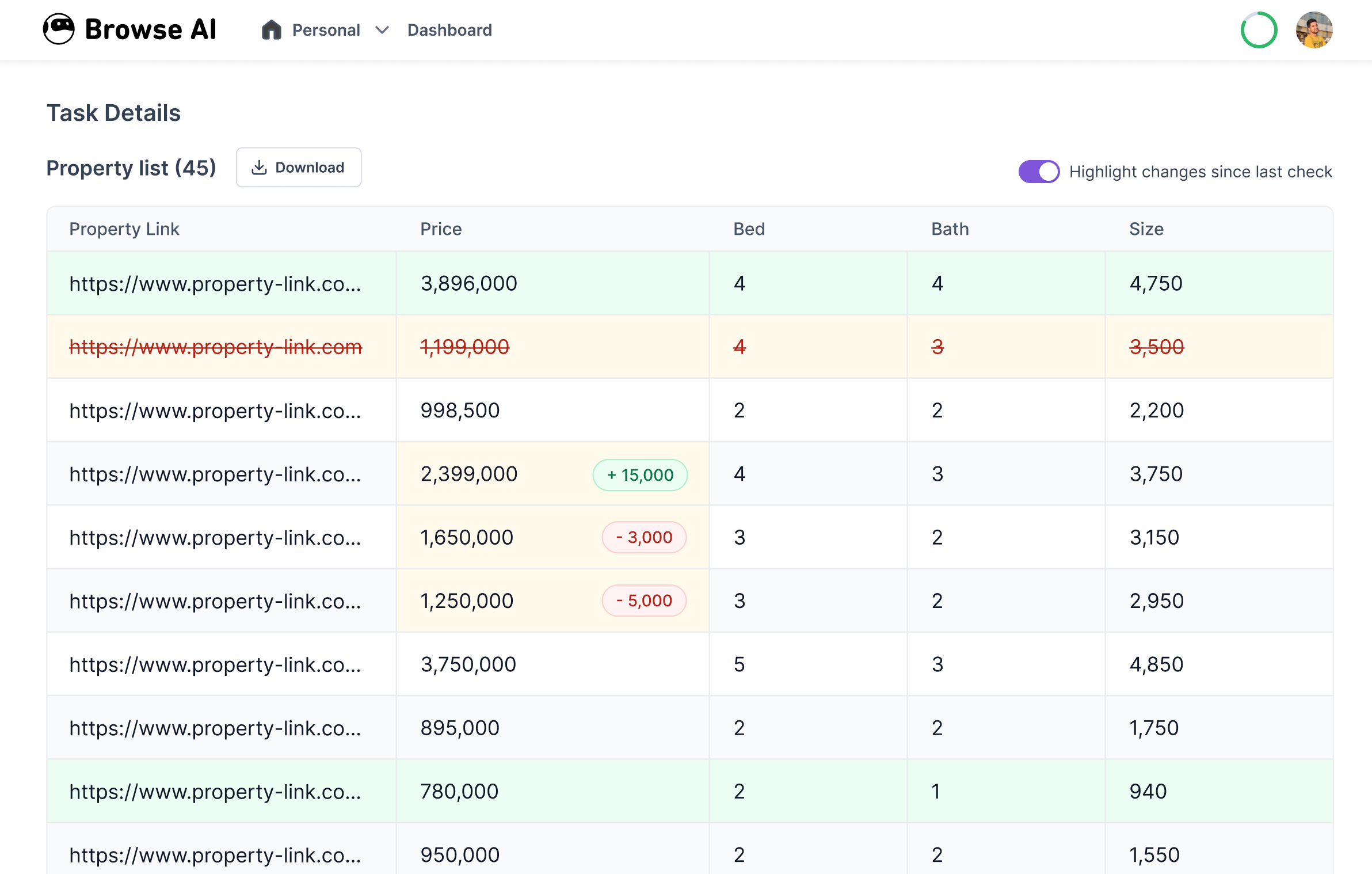
During each run, the robot checks whether new data has appeared or whether existing values have changed. The results are stored as structured datasets that can be reviewed later.
Monitoring capabilities are particularly relevant for pages that update frequently, such as product listings, job boards, or news feeds.
Data Export and Integration
Extracted information can be exported in structured formats such as spreadsheets or JSON datasets. This enables the collected data to be analyzed using common analytical tools or imported into databases.
Browse AI also supports integrations with automation platforms and data workflows, allowing extracted information to trigger additional processes in other software systems.
In practice, this feature connects web data collection with broader data analysis and automation pipelines.
Prebuilt Automation Templates
Some users rely on preconfigured automation templates designed for common data extraction scenarios. These templates typically include predefined robots for tasks such as monitoring ecommerce product listings or extracting search results.
Templates can reduce setup time for users who want to automate well-defined tasks without configuring every step manually.
Handling Dynamic Web Pages
Modern websites often rely on JavaScript frameworks that load content dynamically. Traditional scraping scripts sometimes struggle with these environments.
Browse AI attempts to address this challenge by simulating real browser interactions, allowing the robot to navigate dynamic pages and capture content after it loads.
This capability expands the types of websites that can be monitored through automated extraction.
Common Use Cases
Web data extraction tools are used across a variety of industries. Browse AI is commonly applied in situations where repeated manual data collection would otherwise be required.
Market and Price Monitoring
Organizations that track product pricing often monitor competitor websites or marketplaces. Automated extraction tools can collect pricing data at regular intervals, creating historical records that help analysts observe price fluctuations.
Lead Generation Research
Some marketing teams gather publicly available contact information, company listings, or professional directories to build research datasets. Automation tools can collect structured entries from these sources more efficiently than manual copying.
Academic and Media Research
Researchers and journalists sometimes need to compile large datasets from public web pages. Examples include policy documents, event listings, or archived news content. Automated extraction tools may assist in collecting these records in a consistent format.
Job Market Analysis
Employment portals frequently publish job listings across multiple industries. Data extraction tools can monitor these listings to track hiring trends, required skills, or geographic demand patterns.
Product Catalog Tracking
Retailers and ecommerce analysts may track product availability, stock levels, and listing changes across different platforms. Automated monitoring helps identify updates without repeatedly visiting each page.
Potential Advantages
Reduced Manual Data Collection
One of the primary benefits of tools like Browse AI is the reduction of repetitive manual work. Instead of repeatedly copying information from webpages, users configure an automated process that performs the task consistently.
This can free up time for activities such as analysis, reporting, or decision-making.
Accessibility for Non-Technical Users
Traditional web scraping often requires programming languages such as Python, along with libraries designed for parsing HTML. Browse AI focuses on lowering the technical barrier by providing a visual setup process.
Users who are unfamiliar with coding may still be able to create basic data extraction workflows.
Continuous Monitoring Capability
Automated scheduling allows datasets to grow over time. Instead of capturing a single snapshot of a webpage, monitoring robots can collect multiple observations, making it easier to analyze changes.
For example, price monitoring datasets can reveal trends that would be difficult to observe through occasional manual checks.
Structured Data Output
When data is extracted automatically, it can be formatted into consistent tables or records. Structured datasets are easier to analyze using spreadsheets, statistical tools, or database systems.
This structure improves the efficiency of downstream analysis tasks.
Limitations & Considerations
Website Policy Compliance
Web data extraction must respect the policies and terms of service of the websites being monitored. Some sites restrict automated scraping or require explicit permission for large-scale data collection.
Users should review applicable guidelines before configuring automated extraction workflows.
Page Layout Changes
Many websites update their design or modify page structures periodically. When this happens, extraction robots may fail to locate the previously selected elements.
As a result, users may need to adjust their configurations to match the updated page layout.
Data Quality and Accuracy
Automated extraction depends on the reliability of the patterns used to identify page elements. If a page contains inconsistent formatting or dynamically generated content, the extracted data may occasionally require verification.
Organizations using automated scraping often include validation steps within their data pipelines.
Cost and Resource Constraints
Cloud-based automation platforms typically operate within usage limits such as task frequency, number of robots, or data volume. Users must evaluate whether these limits align with their monitoring requirements.
For large-scale web data collection projects, specialized infrastructure may still be necessary.
Who Should Consider Browse AI
Browse AI may be relevant for individuals or teams that regularly gather structured information from publicly available webpages.
Examples include:
- Market researchers monitoring pricing or product availability
- Journalists compiling datasets from public records or listings
- Academic researchers studying web-published information
- Small businesses tracking competitor catalogs
- Analysts collecting recurring data for reports or dashboards
In many of these cases, the primary value lies in automating repetitive data collection rather than replacing advanced data engineering systems.
Who May Want to Avoid It
While Browse AI can simplify certain automation tasks, it may not be suitable for every situation.
Organizations that may prefer alternative solutions include:
- Developers who require custom scraping scripts with full control over logic and infrastructure
- Large enterprises collecting very high volumes of web data
- Projects involving complex authentication systems or restricted content
- Research teams requiring highly specialized data pipelines or machine learning preprocessing
In these scenarios, programmable scraping frameworks or dedicated data engineering systems may offer greater flexibility.
Comparison With Similar Tools
Browse AI exists within a broader ecosystem of web automation and scraping platforms. While many tools serve similar purposes, they differ in complexity, scalability, and configuration methods.
No-Code Web Scraping Platforms
Several tools provide visual interfaces for configuring data extraction tasks. These platforms typically emphasize accessibility and ease of setup. Browse AI falls into this category, focusing on users who prefer graphical configuration over scripting.
Developer-Focused Scraping Frameworks
Libraries such as those used in programming environments allow developers to build highly customized scraping systems. These frameworks often provide greater flexibility but require technical expertise to implement and maintain.
Browser Automation Tools
Some platforms specialize in automating interactions with web browsers rather than focusing solely on data extraction. These systems can simulate complex user behaviors such as login sequences or form submissions.
Browse AI overlaps with this category to some extent because its robots interact with webpages in a browser-like environment.
Data Aggregation Services
Another related category includes platforms that already provide aggregated datasets collected from multiple sources. In contrast, Browse AI is designed for user-configured data extraction rather than distributing precompiled datasets.
Final Educational Summary
The increasing reliance on web-based information has created a demand for tools that can transform unstructured webpages into usable datasets. Web scraping and automation platforms address this need by allowing users to collect and monitor online information more efficiently.
Browse AI represents one approach within this ecosystem. By offering a visual interface for configuring automated extraction robots, the platform attempts to make web data collection accessible to users who may not have programming experience.
Its features include visual page selection, automated monitoring schedules, structured data exports, and support for dynamic web pages. These capabilities enable a variety of use cases ranging from market monitoring to academic research.
At the same time, users must consider limitations such as website policy compliance, page layout changes, and scalability constraints. As with any automation system, the suitability of the platform depends on the complexity of the data collection task and the resources required to maintain it.
For many small-to-medium research or monitoring workflows, tools like Browse AI illustrate how no-code automation platforms can reduce the time spent gathering data while supporting more consistent information collection processes.
Disclosure: This article is for educational and informational purposes only. Some links on this website may be affiliate links, but this does not influence our editorial content or evaluations.
