
Introduction
Managing financial paperwork has long been a routine but demanding task for individuals and businesses. Receipts, invoices, and expense records accumulate quickly, creating administrative complexity when preparing tax documents, tracking spending, or maintaining compliance records. Paper receipts fade, become misplaced, or accumulate in large volumes, making long-term storage difficult.
As commerce increasingly shifts toward digital platforms, software solutions have emerged to address these documentation challenges. Digital receipt management tools aim to simplify the capture, storage, and organization of financial documents. These systems typically convert paper receipts into searchable digital records and integrate them with accounting or bookkeeping workflows.
Within this category, Shoeboxed operates as a specialized platform focused on receipt digitization, expense tracking, and document archiving. Tools like Shoeboxed are commonly used by freelancers, small business operators, accounting professionals, and organizations that need structured documentation for financial reporting.
Understanding how receipt management platforms function helps clarify their role within modern financial administration and digital recordkeeping.
What Is Shoeboxed?
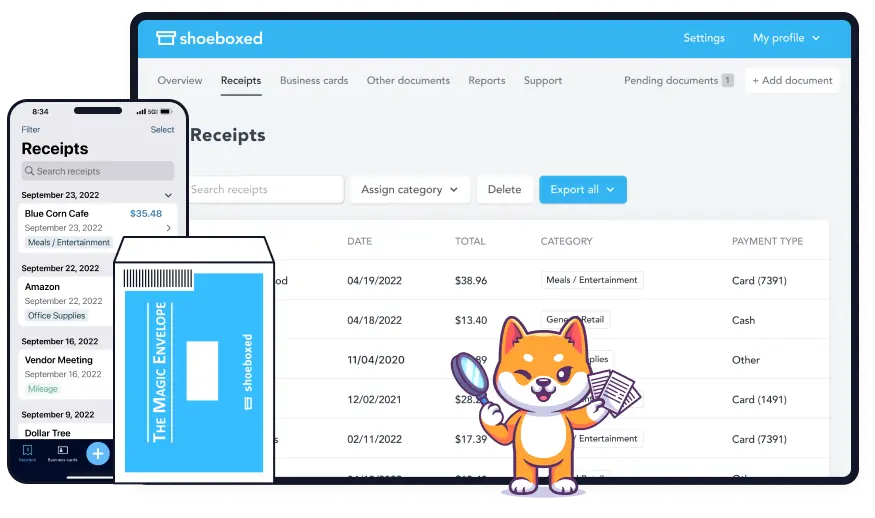
Shoeboxed is a cloud-based receipt management and expense tracking platform designed to digitize financial documents and organize them into structured records. The software focuses on converting paper receipts, invoices, and business cards into digital data that can be categorized, stored, and exported for accounting or reporting purposes.
The platform belongs to the broader category of expense management software and receipt scanning tools, which are commonly used to streamline financial documentation processes. Rather than manually entering receipt information into spreadsheets or accounting systems, users can capture images of receipts through mobile devices or submit physical receipts for scanning.
Shoeboxed extracts key data from receipts—such as vendor name, purchase date, total amount, and payment method—allowing the information to be indexed and searchable within the platform. The structured data can then be exported to accounting systems or used to generate expense reports.
In addition to receipt management, Shoeboxed also supports document storage, mileage tracking, and contact digitization from business cards. These capabilities position the tool within a broader ecosystem of digital bookkeeping and financial organization solutions.
Key Features Explained
Receipt management platforms typically rely on several core capabilities to organize financial records. Shoeboxed incorporates multiple functions designed to streamline document capture, data extraction, and categorization.
Receipt Scanning and Digitization
A central function of Shoeboxed involves converting paper receipts into digital files. Users can photograph receipts using a mobile device or upload scanned images directly to the system. Once uploaded, the platform processes the images and extracts relevant transaction data.
This process transforms unstructured paper documentation into searchable digital records, reducing reliance on manual recordkeeping.
Mail-In Receipt Processing
Shoeboxed also offers an alternative method for digitization through physical mail submission. Users can send batches of receipts to a processing center, where they are scanned and converted into digital records. This method is often used by individuals or businesses with large quantities of paper receipts accumulated over time.
The digitized information is then made accessible within the user’s online account.
Automated Data Extraction
Optical Character Recognition (OCR) technology is commonly used in receipt management software, and Shoeboxed incorporates similar methods to identify and extract important fields from receipts.
The extracted data typically includes:
- Merchant name
- Transaction date
- Purchase amount
- Payment type
- Receipt category
Once captured, the data can be edited or categorized to match a user’s accounting structure.
Expense Categorization
After receipt data is extracted, Shoeboxed allows transactions to be organized into categories. These categories may correspond to accounting classifications such as travel expenses, office supplies, or business meals.
Categorization simplifies later reporting and can help prepare financial data for tax filings or bookkeeping records.
Cloud Storage and Searchability
Digital receipts stored in Shoeboxed are saved in cloud storage, allowing users to retrieve documents from multiple devices. Each receipt becomes searchable through filters or keywords, making it easier to locate specific transactions.
Searchable archives are particularly useful during financial audits or when reviewing past expenses.
Mileage Tracking
For individuals who travel frequently for work, Shoeboxed includes mileage tracking capabilities. The feature allows users to log travel distances associated with business activities.
Mileage data can be recorded and stored alongside receipt documentation, supporting expense calculations related to transportation.
Business Card Digitization
Another component of the platform involves scanning business cards and converting the printed contact details into digital entries. The extracted data can then be stored as structured contact information.
This feature supports professional networking documentation and digital contact management.
Expense Report Generation
Shoeboxed also allows users to generate expense summaries based on categorized receipts. Reports may include time-based summaries, category totals, or transaction lists.
These reports can assist with financial analysis or documentation required for accounting purposes.
Common Use Cases
Digital receipt management tools like Shoeboxed are used across various professional contexts. Their functionality supports different administrative and financial tasks.
Small Business Expense Tracking
Small businesses often deal with numerous purchase receipts related to operations. Digital storage and categorization can help maintain organized expense records throughout the year.
Instead of maintaining physical folders of receipts, business owners can store them digitally and retrieve them when needed.
Freelancers and Independent Contractors
Freelancers frequently manage both personal and business expenses. Accurate documentation becomes important when preparing tax filings or calculating deductions.
Shoeboxed allows freelancers to organize receipts and categorize expenses related to business activities.
Accounting and Bookkeeping Support
Accounting professionals sometimes work with clients who submit large quantities of receipts for documentation. Digitization tools reduce manual data entry and improve the accessibility of financial records.
Receipt management software can therefore assist bookkeeping workflows.
Tax Preparation Documentation
Tax authorities in many jurisdictions require documented proof of certain expenses. Digital receipt storage helps maintain a record of these transactions.
During tax preparation periods, organized digital receipts can simplify the process of verifying deductible expenses.
Travel Expense Management
Employees who travel frequently for work may accumulate receipts from transportation, meals, and lodging. Storing these receipts digitally allows easier expense reporting and reimbursement documentation.
Potential Advantages
Several potential benefits explain why digital receipt management platforms have gained popularity.
Reduced Paper Storage
One major advantage is the reduction of physical paperwork. Paper receipts can degrade over time, while digital versions remain preserved in cloud storage.
Digitization also frees up physical storage space previously used for document filing.
Improved Document Organization
Searchable databases allow users to locate specific receipts quickly. Instead of sorting through physical folders, digital search filters can identify transactions based on vendor, category, or date.
Simplified Expense Reporting
Automated categorization and data extraction can reduce manual entry tasks associated with financial documentation. Organized digital records simplify report generation.
Long-Term Record Preservation
Receipts printed on thermal paper often fade within months or years. Digitally stored versions maintain readable copies for longer periods.
Integration With Financial Workflows
Many receipt management tools integrate with accounting systems or export data in formats compatible with bookkeeping software.
This interoperability helps integrate receipt documentation with broader financial reporting processes.
Limitations & Considerations
Despite their benefits, receipt management platforms also present certain limitations that users should evaluate.
Accuracy of Data Extraction
OCR technology can occasionally misread receipt details, especially when receipts are damaged, faded, or printed with unusual formatting. Users may need to manually verify or correct extracted information.
Subscription Costs
Many digital receipt management services operate on subscription pricing models. The cost may be a consideration for individuals who only manage a small number of receipts annually.
Privacy and Data Security
Financial documents often contain sensitive information. Users should consider the security practices of cloud storage systems before storing receipts digitally.
Learning Curve
Although receipt scanning tools are designed for convenience, new users may require time to understand categorization systems, reporting features, and integration options.
Dependence on Internet Access
Cloud-based platforms typically require internet connectivity for synchronization and document access. Offline usage may be limited depending on the platform’s design.
Who Should Consider Shoeboxed
Shoeboxed may be relevant for individuals or organizations that handle large numbers of receipts or need structured financial documentation.
Examples include:
- Small business owners managing operational expenses
- Freelancers and consultants tracking deductible costs
- Accounting professionals organizing client documentation
- Remote workers submitting reimbursement reports
- Entrepreneurs maintaining financial records for tax purposes
Users in these roles often benefit from centralized document storage and automated data extraction.
Who May Want to Avoid It
Not every user requires dedicated receipt management software. Certain groups may find limited value depending on their needs.
For example:
- Individuals with very few receipts to track annually
- Users already relying on accounting software with built-in receipt scanning
- Businesses with existing enterprise expense management systems
- Those uncomfortable storing financial records in cloud platforms
In such situations, simpler documentation methods may already meet organizational needs.
Comparison With Similar Tools
Shoeboxed exists within a competitive ecosystem of receipt scanning and expense tracking software. Several platforms offer overlapping functionality, though their focus and features may differ.
Receipt Bank (now Dext)
Dext primarily targets accounting professionals and businesses that need automated bookkeeping workflows. Its emphasis is on integrating receipt data directly with accounting systems.
Expensify
Expensify focuses heavily on expense reporting and employee reimbursement management. It is often used by companies managing travel expenses across teams.
Evernote Scannable
Some general document scanning apps, such as Evernote’s scanning tools, also allow receipt digitization. However, they may not provide structured expense categorization or financial reporting features.
Wave Receipts
Wave’s receipt scanning functions are integrated into its accounting platform. Users already using Wave for bookkeeping may rely on its built-in tools rather than external receipt management systems.
While these tools share overlapping features, differences often appear in areas such as accounting integration, team expense management, and pricing structures.
Final Educational Summary
Digital receipt management tools have become increasingly relevant as businesses and individuals seek more efficient ways to organize financial documentation. By converting paper receipts into searchable digital records, these platforms aim to reduce administrative workloads and improve record accessibility.
Shoeboxed represents one example within this category, offering receipt scanning, expense categorization, mileage tracking, and document archiving features. Its focus on digitizing financial documents reflects a broader trend toward paperless financial management and cloud-based recordkeeping.
Like many financial software tools, Shoeboxed presents both advantages and limitations. The platform can assist with document organization and expense tracking, but users must also consider factors such as data accuracy, subscription costs, and privacy concerns.
Understanding the capabilities and limitations of receipt management software helps individuals and organizations determine whether such tools align with their documentation and financial reporting needs.
Disclosure: This article is for educational and informational purposes only. Some links on this website may be affiliate links, but this does not influence our editorial content or evaluations.
