
Introduction
Digital communication has become a central component of modern business operations. Teams distributed across different locations frequently rely on real-time visual collaboration to demonstrate products, troubleshoot issues, or guide clients through complex information. As a result, screen sharing software has emerged as a specialized category within the broader ecosystem of remote communication tools.
Traditional video conferencing platforms often include screen sharing as a secondary feature. However, many professionals—particularly in sales, customer support, consulting, and onboarding—require faster, more lightweight solutions that allow them to share a screen instantly without requiring participants to install new software or create accounts.
Tools developed specifically for instant screen sharing attempt to remove technical barriers that can slow down remote conversations. One example of this category is CrankWheel, a platform designed to facilitate quick screen demonstrations during phone calls or live interactions.
This article provides an analytical overview of CrankWheel, examining its functions, practical use cases, advantages, and limitations within the wider context of remote collaboration technology.
What Is CrankWheel?
CrankWheel is a screen sharing and remote presentation tool designed primarily for sales conversations and customer support interactions. The platform allows a presenter to share their screen with another person through a simple link, often without requiring the viewer to install software or create an account.
Unlike traditional meeting platforms that focus on full virtual meetings with multiple participants, CrankWheel is built around instant screen demonstrations that can occur alongside a phone call. In many cases, a salesperson or support agent can send a short access link to a prospect or customer during a conversation, enabling the viewer to immediately see what appears on the presenter’s screen.
From a software classification perspective, CrankWheel falls into several overlapping categories:
- Screen sharing software
- Remote sales presentation tools
- Customer support demonstration platforms
- Browser-based collaboration tools
Its design philosophy focuses on speed and accessibility, emphasizing minimal setup for the person receiving the screen share.
Key Features Explained
Instant Screen Sharing
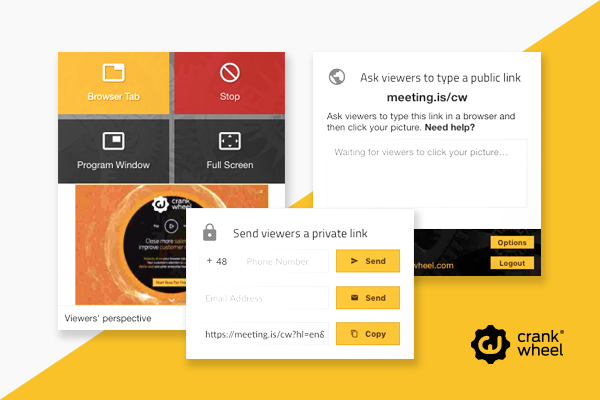
One of the central capabilities of CrankWheel is the ability to initiate a screen sharing session quickly. The presenter typically generates a link that the viewer can open in a browser. Because the viewer does not necessarily need to install additional software, the process may reduce friction during spontaneous demonstrations.
This feature is particularly relevant in sales environments where conversations happen in real time and delays can interrupt the flow of communication.
Browser-Based Viewing
CrankWheel allows recipients to view shared screens directly through a web browser. This approach aims to accommodate different devices and operating systems without requiring complex configuration.
The browser-based model also helps reduce compatibility issues that can occur when participants use different hardware platforms such as:
- Desktop computers
- Laptops
- Tablets
- Smartphones
Because many viewers already rely on web browsers as their primary access point to digital services, this design simplifies participation.
Mobile-Friendly Screen Sharing
Another notable element of CrankWheel is its compatibility with mobile devices. Viewers can often access shared presentations from smartphones or tablets.
In situations where a prospect or client is away from a desktop computer, mobile access allows the screen demonstration to continue without waiting for a more traditional meeting setup.
Mobile compatibility is increasingly important in modern communication workflows, particularly in industries where professionals frequently interact while traveling or working remotely.
Presenter Control Options
CrankWheel provides presenters with control over what is displayed on the shared screen. Instead of exposing an entire desktop environment, users may be able to focus on specific windows or content.
This helps presenters maintain control of the demonstration while limiting exposure of unrelated applications or sensitive information.
Typical presentation controls can include:
- Selecting a specific screen or application window
- Adjusting display focus
- Managing viewer visibility
These controls contribute to a more structured presentation experience.
Optional Video Integration
In addition to screen sharing, CrankWheel may support optional webcam video from the presenter. This allows the person demonstrating content to appear alongside the shared screen.
Video can provide additional visual context in conversations where personal interaction is helpful, though it is not always necessary for basic screen demonstrations.
Session Recording
Some users rely on recording features to document presentations, training sessions, or product walkthroughs. Recording allows sessions to be reviewed later for internal documentation or analysis.
In educational and support contexts, recordings can help teams analyze communication processes and improve future demonstrations.
Common Use Cases
Screen sharing platforms like CrankWheel are used across multiple professional contexts. The following examples illustrate how organizations may integrate such tools into everyday operations.
Sales Demonstrations
Sales representatives frequently explain products, pricing models, or onboarding processes during live conversations with potential customers. A screen sharing session can provide visual support for these explanations.
Instead of describing an interface verbally, the presenter can display it directly on the viewer’s screen.
Customer Support Assistance
Technical support teams often use screen sharing to help customers navigate software interfaces or troubleshoot issues. When a customer can see the instructions visually, it may reduce misunderstandings.
Support agents can guide users step by step while referencing specific elements on the screen.
Product Walkthroughs
Software companies often provide demonstrations of new features to prospects or existing customers. Screen sharing tools allow product specialists to highlight capabilities in real time.
This type of demonstration can also be used internally for training sales or support teams.
Remote Onboarding
New users sometimes require guidance during the initial setup of digital platforms. Screen sharing can assist in onboarding by allowing instructors to walk through interfaces while explaining how features work.
Such sessions can be conducted individually or with small groups.
Consulting and Advisory Sessions
Consultants working remotely may need to review documents, dashboards, or analytical tools with clients. Screen sharing enables them to present these materials without transferring files or creating complex meeting environments.
Potential Advantages
Reduced Technical Barriers
A recurring challenge in remote communication is the difficulty some participants experience when joining virtual meetings. Installation requirements, software compatibility issues, and account creation can slow down interactions.
CrankWheel’s browser-based viewing model may reduce these barriers by allowing participants to access a session through a simple link.
Speed of Setup
Instant screen sharing tools aim to shorten the time required to initiate a visual presentation. For professionals who frequently conduct demonstrations during phone calls, quick setup can help maintain the natural flow of conversation.
Device Flexibility
Because viewers may access sessions through a browser, the tool can function across various devices and operating systems. This flexibility can be helpful when participants rely on different technologies.
Focused Demonstrations
Unlike large meeting platforms that include numerous features unrelated to presentations, a specialized screen sharing tool may focus on a narrower set of functions. For some workflows, this simplicity can streamline the presentation process.
Integration with Sales Workflows
Sales professionals often rely on multiple tools for customer relationship management, communication, and analytics. Screen sharing platforms designed with sales environments in mind may integrate with these workflows more easily.
Limitations & Considerations
Dependence on Internet Connectivity
Like most real-time communication tools, CrankWheel requires a stable internet connection for effective screen sharing. Network instability may lead to delays, reduced video quality, or interruptions during sessions.
Limited Collaboration Features
Platforms focused primarily on screen demonstrations may not provide the full collaboration environment found in comprehensive video conferencing systems. Features such as large group meetings, breakout rooms, or advanced document collaboration may be limited or absent.
Organizations requiring extensive team collaboration tools may rely on broader platforms alongside specialized screen sharing software.
Privacy and Data Security
Screen sharing tools inherently involve transmitting visual information from one device to another. Users must remain aware of what appears on the screen during presentations to avoid exposing sensitive data.
Proper security practices—including limiting visible applications and controlling access links—can help mitigate these risks.
Learning Curve for Presenters
While viewers may find browser-based access simple, presenters still need to understand how to configure screen sharing settings, select windows, and manage sessions effectively.
Training may be necessary for teams implementing the tool across large organizations.
Who Should Consider CrankWheel
CrankWheel may be relevant for professionals whose work involves frequent real-time demonstrations during conversations.
Examples include:
- Sales representatives presenting software or services
- Customer support teams guiding users through interfaces
- Consultants explaining analytical dashboards
- Account managers providing product walkthroughs
- Trainers conducting remote onboarding sessions
These roles often benefit from tools that enable fast visual communication without complex meeting setups.
Who May Want to Avoid It
Not every organization requires a specialized screen sharing platform. Some users may find other tools more suitable depending on their communication needs.
Groups that may prefer alternative solutions include:
- Teams requiring large multi-participant meetings
- Organizations focused primarily on video conferencing
- Educational institutions running structured online classes
- Businesses needing extensive collaboration tools such as shared whiteboards or project spaces
In such contexts, broader collaboration platforms may offer more comprehensive functionality.
Comparison With Similar Tools
The screen sharing and remote presentation category includes several well-known platforms, each designed with different priorities.
Some tools emphasize large virtual meetings, while others focus on instant demonstrations during conversations.
General differences within this category may include:
| Feature Area | Instant Screen Sharing Tools | Full Meeting Platforms |
|---|---|---|
| Setup Time | Often quick | May require scheduled meetings |
| Participant Requirements | Browser access may suffice | Usually requires software or accounts |
| Meeting Size | Typically small groups | Supports large groups |
| Collaboration Features | Limited | Extensive |
| Presentation Speed | Designed for rapid demos | More structured meetings |
CrankWheel occupies a niche within the first category, prioritizing fast screen sharing rather than comprehensive meeting management.
Organizations often evaluate these tools based on factors such as:
- Communication workflow
- audience size
- device compatibility
- integration with existing systems
Final Educational Summary
Screen sharing has become an essential capability in modern digital communication, particularly for professionals who must explain products, troubleshoot issues, or guide clients through software interfaces remotely.
CrankWheel represents a category of tools designed to simplify this process by enabling rapid screen demonstrations during live conversations. Its browser-based viewing approach attempts to minimize technical barriers for participants while supporting real-time presentations across multiple devices.
While the platform provides advantages related to accessibility and speed, it also operates within a more focused feature set compared to comprehensive meeting platforms. Organizations evaluating screen sharing solutions must therefore consider their communication needs, audience size, and collaboration requirements before selecting a tool.
Understanding the role of specialized screen sharing platforms helps businesses and professionals choose technologies that align with their operational workflows and communication styles.
Disclosure: This article is for educational and informational purposes only. Some links on this website may be affiliate links, but this does not influence our editorial content or evaluations.
